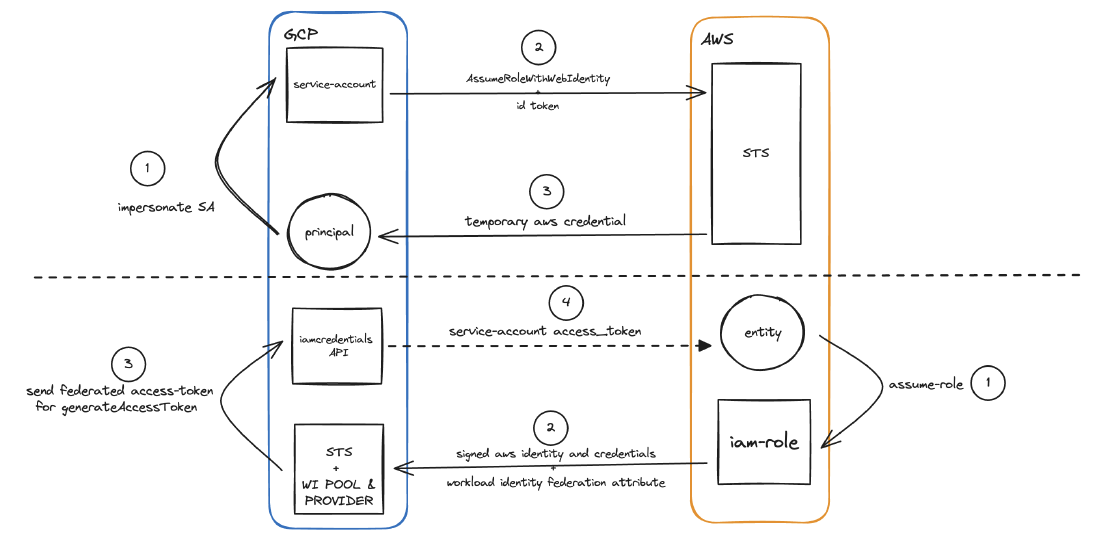
Intro
Static, long-term credentials are easier to set up. Examples are an IAM Access Key for AWS or a Service Account Key for GCP. But if those credentials leak, unauthorized parties can get access to your resources. Revoking them is hard work.
So I recommend short-lived, dynamic credentials instead. There is no static value to store or distribute, so the information is harder to leak. They also come with attribute-based mapping and filtering, which make more granular access control possible.
In this example, I cover AssumeRoleWithWebIdentity and Workload Identity (WI) Federation between AWS and GCP. With them, resources do not share hardcoded credentials.
Prerequisites
Install these tools before you start:
- gcloud CLI
- AWS CLI
- Python3. Also enable pip, pipenv, and virtualenv
- Terraform
In my case, asdf installed and managed all of those tools. The exception is Terraform, which tfenv manages.
Materials
All sample code and scripts are in this repository: https://github.com/franzramadhan/franzramadhan-dot-dev-materials/tree/master/02-gcp-to-aws-short-lived-credential.
Check them and adjust them to your needs. If my example matches what you need, read the README and set the mandatory files and variables.
Authenticate to AWS from GCP using AssumeRoleWithWebIdentity
“AssumeRoleWithWebIdentity returns a set of temporary security credentials for users who have been authenticated in a mobile or web application with a web identity provider. Example providers include the OAuth 2.0 providers Login with Amazon and Facebook, or any OpenID Connect-compatible identity provider such as Google or Amazon Cognito federated identities.”
To enable AssumeRoleWithWebIdentity, we get service account credentials on Google Cloud and exchange them for AWS role credentials.
Action Items
Create a service account in GCP
Get the unique ID of the service account and write it down
Create an IAM role in AWS
In the assume_role_policy, allow federated access only from the Google account and the unique ID of the service account. For example:
 {
     "Version": "2012-10-17",
     "Statement": [
         {
             "Effect": "Allow",
             "Principal": {
                 "Federated": "accounts.google.com"
             },
             "Action": "sts:AssumeRoleWithWebIdentity",
             "Condition": {
                 "StringEquals": {
                     "accounts.google.com:aud": "<service-account-unique-id>>"
                 }
             }
         }
     ]
 }
When this is complete, you can get the credential from our script as an external process. See source credentials with an external process.
AssumeRoleWithWebIdentity Material Resources
These resources give a quick overview of the steps above:
- Terraform Code for Provisioning the GCP service-acccount
- Terraform Code for Provisioning the AWS IAM Role
- AssumeRoleWithWebIdentity Technical Implementation
- Script to Assume AWS IAM Role from GCP SA
Workload Identity Federation from AWS to GCP
Using workload identity federation, workloads that run on AWS and Azure can exchange their environment-specific credentials for short-lived Google Cloud Security Token Service tokens.
For the complete picture and setup, read the official GCP documentation Configure workload identity federation with AWS or Azure.
In short, these steps let the AWS IAM role get a service account credential through workload identity:
- Create a workload identity pool
- Create a workload identity pool provider for AWS and set the allowed source AWS account ID
- In the workload identity pool provider, do these steps:
- Create an attribute mapping between the AWS STS assumed-role credential and Google subjects
- Create an attribute condition that allows only a specific role to make the authentication attempt
- Give this workload identity pool access to the service account. Select the attribute to use as the identifier.
- When all of this is set and you have the IAM role credential, use the script in the materials. It generates a service account access token, which you use as the google-cloud auth credential
Workload Identity Federation from AWS to GCP Material Resources
These resources give a quick overview of the steps above:
- Terraform Code for Provisioning the GCP service-acccount
- Terraform Code for Provisioning Workload Identity pool and provider
- WorkloadIdentityFederation Implementation
- Script to Impersonate GCP SA from AWS IAM Role
Resources
You can also read the code in this repository. Change it as you like.
