Intro
The cluster needed a database. My first idea was CloudNativePG on Longhorn. Then I looked at what the hardware actually offered, and at what each layer already replicates.
TL;DR: Label each worker with its physical host (
topology.kubernetes.io/zone), taint the weak host’s worker so only quorum members run there, give one worker per strong host a 100G NVMe data disk, and run CloudNativePG with 2 instances on node-local storage. PostgreSQL already replicates itself, so Longhorn underneath would only copy every write twice.
The Figure
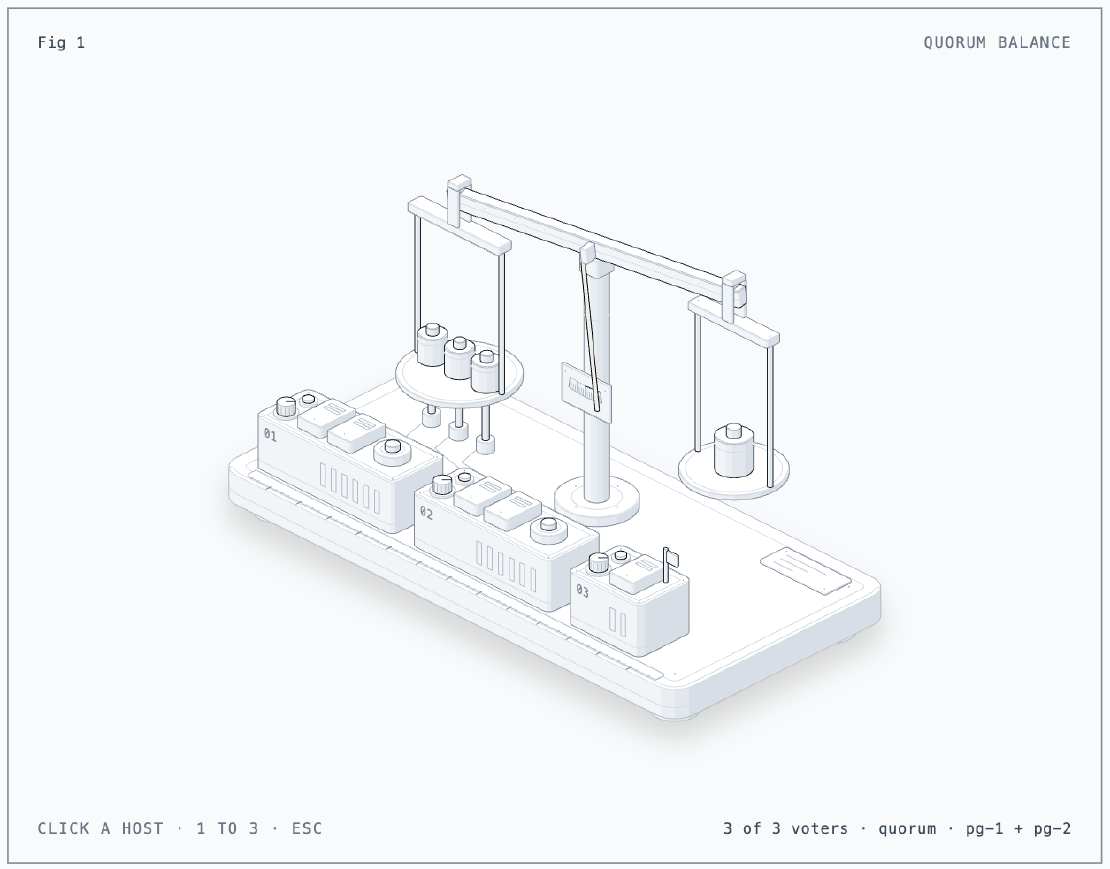
Each Proxmox host puts one weight on the left pan: its OpenBao Raft voter. The
counterweight on the right is one and a half votes, so any two hosts tip the
beam to quorum, and the weak pve-03 counts exactly as much as the strong
ones. Click a host or press 1, 2 or 3 to take it down: its lift pin pushes
the weight off the pan and the readout shows what is left of Raft and of
CloudNativePG, whose two instances sit on the NVMe disks of pve-01 and
pve-02. I built the figure with the
anatomy agent skill.
The Situation
| Host | Free disk | Free RAM | Workers |
|---|---|---|---|
pve-01 | 762G NVMe, 917G SATA | 11 GB | 2 |
pve-02 | 775G NVMe, 935G SATA | 11 GB | 2 |
pve-03 | 59G SSD (+ 1TB slow HDD) | 0 GB | 1 |
- CloudNativePG 1.30.1 (chart 0.29.1), PostgreSQL 18.6
- local-path-provisioner v0.0.37
Setup
Topology: two workers per host is a trap
Each strong host runs two workers. Anti-affinity on node names alone happily
puts both “redundant” replicas on the same physical machine. So every worker
gets a zone label for its host, persisted in k0sctl.yaml:
installFlags:
  - --labels=topology.kubernetes.io/zone=pve-01,lab/data-disk=true
pve-03: quorum only
pve-03 had 0 GB free, and its worker used about 1 GB of its 4 GB. I trimmed
it to 2.5 GB (drain, qm set --memory 2560, reboot, uncordon), which gave the
host 3 GB back, and tainted it:
installFlags:
  - --taints=dedicated=quorum:NoSchedule
Only OpenBao tolerates the taint, because its third Raft voter has to live on a third machine for quorum to survive a host failure. Everything else runs on the two fast hosts. DaemonSets like Cilium tolerate all taints, so networking keeps running there.
NVMe data disks
One worker per strong host gets a 100G disk from the NVMe pool, hot-plugged
without a reboot, formatted ext4, mounted at /mnt/data by UUID. local-path
then sends those nodes there:
{"nodePathMap": [
  {"node": "DEFAULT_PATH_FOR_NON_LISTED_NODES", "paths": ["/opt/local-path-provisioner"]},
  {"node": "k0s-pve-01-worker-1", "paths": ["/mnt/data/local-path"]},
  {"node": "k0s-pve-02-worker-1", "paths": ["/mnt/data/local-path"]}
]}
CloudNativePG without Longhorn
CloudNativePG replicates at the PostgreSQL level: a primary plus streaming replicas, each with its own volume. Its own documentation recommends node-local storage for that reason. Longhorn below it would add network round trips to every write and double the disk use, with no extra safety.
apiVersion: postgresql.cnpg.io/v1
kind: Cluster
metadata:
  name: pg
spec:
  instances: 2
  storage:
    storageClass: local-path
    size: 20Gi
  affinity:
    nodeSelector:
      lab/data-disk: "true"
    enablePodAntiAffinity: true
    podAntiAffinityType: required
    topologyKey: topology.kubernetes.io/zone
| Instance | Node | Host | Role |
|---|---|---|---|
pg-1 | k0s-pve-01-worker-1 | pve-01 | primary |
pg-2 | k0s-pve-02-worker-1 | pve-02 | streaming replica |
A row written on pg-1 was readable on pg-2 a second later. Backups to object
storage come later; replicas don’t protect against a bad DROP TABLE.
Issue 1: mkfs Matched Two Disks
Symptom
To format the new data disk, my first script picked it by size:
d=$(lsblk -dnpo NAME,SIZE,TYPE | awk '$2=="100G" && $3=="disk" {print $1}')
mkfs.ext4 -q -L data "$d"
It failed:
The file /dev/sda
/dev/sdb does not exist and no size was specified.
Cause
The root disk was also 100G, so $d held both devices. The newline between
them made mkfs see one nonexistent path, which is the only reason nothing was
formatted. The device names were also swapped between the two VMs: on one the
new disk was sdb, on the other sda, with root on sdb.
Fix
Both root filesystems were intact. The safe version selects by state, not by size or name: a whole disk with no partitions, no filesystem and no mountpoint, and it stops unless exactly one disk matches:
for d in $(lsblk -dnpo NAME,TYPE | awk '$2=="disk"{print $1}'); do
  [ "$(lsblk -npo NAME "$d" | wc -l)" = 1 ] || continue   # no partitions
  [ -z "$(lsblk -dno FSTYPE "$d")" ] || continue          # no filesystem
  [ -z "$(lsblk -dno MOUNTPOINT "$d")" ] || continue      # not mounted
  c="$c $d"
done
set -- $c; [ $# -eq 1 ] || { echo "expected 1 blank disk, found: $c"; exit 1; }
Issue 2: The First Volume Landed on the Root Disk
Symptom
pg-1’s volume was under /opt/local-path-provisioner, pg-2’s under
/mnt/data.
Cause
The provisioner hadn’t reloaded its new nodePathMap yet when pg-1’s volume
was created.
Fix
The cluster was empty, so I deleted it with its volumes and recreated it. Both volumes then landed on the NVMe disks.
Lessons
- Don’t stack replication layers. If the application replicates, give it local disks.
- Topology labels should describe physical failure domains, not VMs.
- A weak node can still carry its weight as the tiebreaker for quorum.
- Select disks by state, never by size or device name. Both can collide or change between otherwise identical VMs.
Series
This post is part of Homelab Rebuild:
- Part 1: Upgrading Proxmox VE 8 to 9
- Part 2: Starting Over When the IaC Is Broken
- Part 3: When Tailscale Breaks Your Cilium Gateway
- Part 4: Living on the Tailnet
- Part 5: Secrets Without Secrets in Git
- Part 6: Certificates, DNS and a Private CA
- Part 7: Self-Hosted CI and Getting Back to IaC
- Part 8: Stateful Workloads on Unequal Hardware (this post)
- Part 9: Going Public Safely with Cloudflare Tunnel
- Part 10: When the Hypervisor Went Quiet
- Part 11: Hardening the Cluster in Five Layers
- Part 12: Observability with Coroot, and Losing pve-01
- Part 13: The Host That Kept Losing Power
- Part 14: Observability, Take Two with OpenTelemetry
- Part 15: Requests and Limits for Everything
- Part 16: Handing the Cluster to FluxCD
- Part 17: Making the Guardrails Earn Their Keep
- Part 18: When the API Server Outgrew Its VM
- Part 19: Logging In to OpenBao with Cloudflare Access and Google
- Part 20: Headlamp SSO, or Teaching kube-apiserver to Trust Cloudflare Access
- Part 21: pve-02 Loses Power, and Pi-hole Has Nowhere to Go
- Part 22: Turning Four Days of Fixes into AI Runbooks
- Part 23: microVM Sandboxes on Proxmox
- Part 24: Pi-hole Without a Home Host
- Part 25: It Was the Router
- Part 26: TLS on the Front, Plaintext Behind It
- Part 27: One Bad Power Adapter, Two Different Deaths
- Part 28: Observability, Take Three: Making It Worth Looking At
- Part 29: One Meter for Every Model, LiteLLM on Workers AI
- Part 30: Proxmox Joins the SSO, and a Plan Token Loses Admin
- Part 31: First Backups, Postgres, OpenBao and etcd to R2
- Part 32: Alerts That Reach Me, Even When the Lab Is Dead
- Part 33: The Firewall Held, the Tailnet Did Not
- Part 34: From Watching to Blocking, and a Record of Who Did What
- Part 35: Wazuh Without the 8 GB, Endpoint Security for One Mac and Three Hosts
- Part 36: The Fans Were Loud, the CPUs Were Idle
- Part 37: A Power Trip, a Search Domain and a Wildcard
- Part 38: An Autonomous AI Pentester in a Sealed Box
- Part 39: Wasm Pods on k0s, and the Label That Kept Them Packed