Intro
Twenty-three posts into rebuilding the homelab, one question still had no single answer: from where I sit right now, what can I actually reach? The answer is spread across a Tailscale operator, two Gateway API gateways, Pi-hole, a keepalived VIP and a Cloudflare Tunnel. A box-and-arrow diagram made it look like everything connects to everything. That is the opposite of the point.
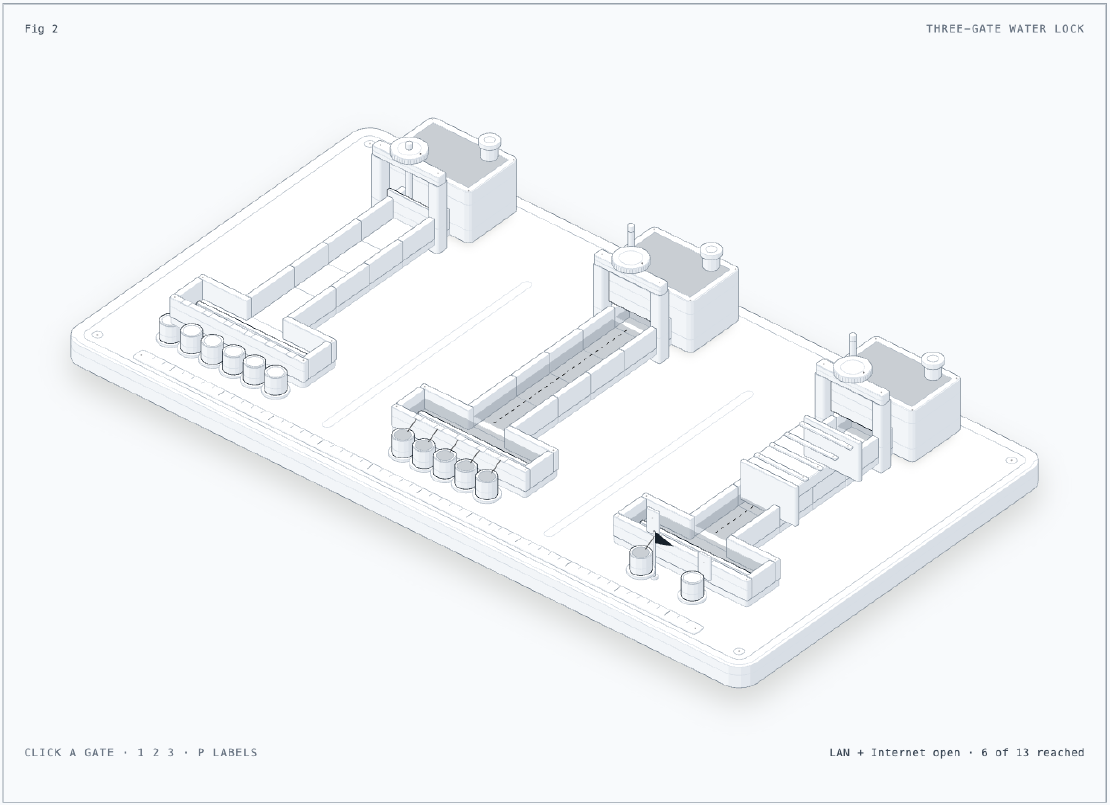
So I drew it as a small hydraulics bench instead: three tanks, three sluice gates, three channels that never touch, and a row of cups at the end of each channel, one cup per endpoint.
TL;DR: there are three separate ways in, and none of them leaks into another. The tailnet reaches six endpoints through the Tailscale operator. The LAN reaches five through the API VIP,
lab-gatewayand Pi-hole. The internet reaches onlypublic-gateway, which accepts routes from namespaces labelledexposure=public, and today no namespace has that label.
The Situation
- 3 Proxmox VE 9 hosts, 8 k0s VMs, Flux owns the cluster
- Cilium 1.20.2 as CNI, LB IPAM (
192.168.101.152to.168), L2 announcements and the Gateway API - Tailscale operator 1.102.4: API server proxy plus Tailscale Ingresses
- cloudflared 2026.10.0, 2 replicas, one per host
- Home LAN
192.168.101.0/24, Pi-hole on192.168.101.161
| Zone | Who is in it | Entry point | Auth |
|---|---|---|---|
| Tailnet | my devices, from anywhere | Tailscale operator | tailnet identity (plus OIDC on the UIs) |
| LAN | devices at home | API VIP .151, lab-gateway .152, Pi-hole .161 | k0s admin cert, per app |
| Internet | anyone | Cloudflare Tunnel to public-gateway | per app |
The Figure
The back row is where the traffic starts: tailnet on the left, home LAN in the
middle, internet on the right. Opening a gate means connecting from there.
Water that reaches a cup is a request that reaches an endpoint. Click a gate or
press 1, 2 or 3. P labels a namespace public. That lifts one shutter
on the internet chamber and puts up a pennant.
I generated the figure with the anatomy agent skill. The skill builds interactive isometric SVG figures from a description of the system.
Zone 1: Tailnet
The Tailscale operator is the weir in the left channel. It does two jobs.
The first is the Kubernetes API. The operator runs an API server proxy in auth
mode. So kubectl from my laptop authenticates as my tailnet identity, and the
group:admin tailnet group impersonates system:masters:
# kubernetes/apps/tailscale-operator/values.yaml
apiServerProxyConfig:
  mode: "true"
The second is the UIs. Grafana, OpenBao and Headlamp each get a Tailscale
Ingress. The Ingress gives each one a *.ts.net name with a Tailscale TLS certificate:
apiVersion: networking.k8s.io/v1
kind: Ingress
metadata:
  name: grafana-tailnet
spec:
  ingressClassName: tailscale
  defaultBackend:
    service:
      name: grafana
      port:
        number: 80
  tls:
    - hosts:
        - grafana
Pi-hole DNS is also exposed on the tailnet, and the nodes take SSH through
Tailscale SSH in check mode. That is six cups. All of them are named services,
not addresses. When I am on the tailnet, I am not on 192.168.101.0/24.
Zone 2: LAN
At home, nothing goes through Tailscale. The middle channel has three entrances.
- The API VIP. keepalived floats
192.168.101.151:6443across the three controllers. The rootkubeconfigwith the k0s admin cert works only from here. lab-gateway. A Cilium Gateway on192.168.101.152with one HTTP listener and two HTTPS listeners. The first HTTPS listener is*.franzramadhan.labwith a certificate from my lab CA. The second is*.franzramadhan.devwith a Let’s Encrypt wildcard. Every namespace can attach routes to it (from: All), because a device on the LAN is already at home.- Pi-hole.
192.168.101.161answers*.franzramadhan.labwith.152, sohttps://grafana.franzramadhan.lablands on the gateway.
SSH to the nodes and to the microVM sandboxes on pve-01 also goes straight over the LAN. That is five cups.
Zone 3: Internet
The right channel is the only one with a roof: the Cloudflare Tunnel. Two
cloudflared pods dial out to Cloudflare, so there is no open port on my
router. Cloudflare terminates TLS at the edge and sends *.franzramadhan.dev down
the tunnel to public-gateway on port 80.
What makes this channel different is the listener on public-gateway:
listeners:
  - name: http
    protocol: HTTP
    port: 80
    hostname: "*.franzramadhan.dev"
    allowedRoutes:
      kinds:
        - kind: HTTPRoute
      # opt-in: only namespaces labeled exposure=public can publish through the tunnel
      namespaces:
        from: Selector
        selector:
          matchLabels:
            exposure: public
An HTTPRoute in any other namespace can name public-gateway as its parent,
and nothing happens: the gateway refuses it. Those are the shutters in the
figure. To publish an app, I label its namespace and attach the route to
public-gateway. I mark the route external-dns.kubernetes.io/cloudflare-proxied: "true", and external-dns creates the CNAME to the tunnel.
Two more details about this channel:
- The wildcard record is gone on purpose. When you create a tunnel route,
the Cloudflare dashboard adds a
*.franzramadhan.devDNS record that points at the tunnel. I deleted it. With it, every name under the domain resolves into the tunnel. Without it, a name exists only after external-dns creates it for a route thatpublic-gatewayaccepted. public-gatewaystill has a LAN address. Cilium gives its Service192.168.101.154from the same pool. Nothing in DNS points there, so in practice only the tunnel uses it.
Today no namespace carries exposure=public. In the figure, opening the
internet gate fills the chamber and stops at the shutters.
Why No Subnet Router
Tailscale can advertise 192.168.101.0/24 from a node and make the whole LAN
reachable from anywhere. I do not do that, and the gutters between the
channels in the figure are there to show it.
A subnet router joins the tailnet channel to the LAN channel. Then every LAN address is one hop from any device on my tailnet. That includes the VIP with its admin cert, the Proxmox web UIs and anything else on the home network. Without it, the tailnet reaches only what I published to it, one service at a time, each with its own name and certificate. The cost: for LAN-only things (Proxmox, the raw VIP), I must be at home or hop through a node.
Lessons
- Draw what can reach what, not what talks to what. The flowchart in my architecture notes has arrows between everything. Three channels that never touch show the actual boundaries.
- Make internet exposure opt-in at the gateway. A namespace selector on the listener means a forgotten label leaves an app private. The opposite default publishes it.
- The dashboard’s helpful defaults are part of the attack surface. The wildcard record that Cloudflare creates for a tunnel route widens what reaches the tunnel. I deleted it as a design decision, so it is written in the cloudflared README.
- Each zone gets its own auth. Tailnet identity on the tailnet, a client cert on the LAN API, and per-app auth on the internet.
Related
- Homelab Rebuild Part 4: Living on the Tailnet
- Homelab Rebuild Part 6: Certificates, DNS and a Private CA
- Homelab Rebuild Part 9: Going Public Safely with Cloudflare Tunnel