Intro
For four days, my two ThinkCentre hosts kept dying. pve-01 went first (Parts 12 and 13): resets every few minutes, a POST hang, then silence. A swap of its power adapter with pve-02’s stopped it. A day later pve-02, now on pve-01’s old adapter, started dying too (Part 21), but in a completely different way.
Below is what each host did, how the logs pointed at the adapter and not at the disks, and what the new adapter shows so far.
TL;DR: One worn adapter, two failure modes. On pve-01 it caused instant resets with zero disk errors. On pve-02 it caused a slow brown-out (a sag in supply voltage). The SATA SSD degraded and detached, and the host hung for 14 to 52 minutes, then dropped. pve-02’s SSD had 0 errors in 34 boots over 16 months on its own adapter, and errors in every boot on the bad one. On a new adapter it logged 0 errors so far (about 16 hours on 2026-10-17 morning). This is not final yet: on the bad adapter, the first error took 27 hours.
The Figure
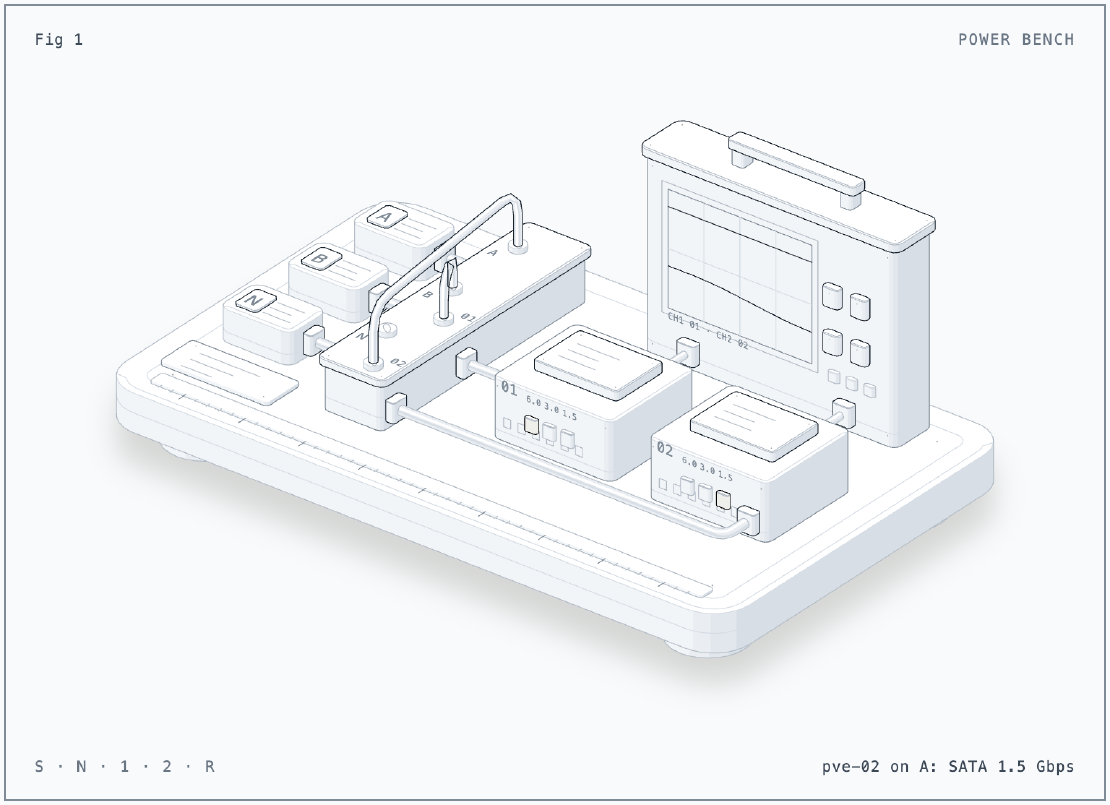
The figure is a test bench. Bricks A, B and N on the left are the power
adapters: A is the worn one, B is pve-02’s own, N is the new one. Patch cords
on the panel decide which brick feeds which mini PC, 01 (pve-01) or 02
(pve-02). Each PC has its SATA SSD on top and three lamps on the front for
the link speed. The scope at the back draws one supply trace per PC. It
starts with A on pve-01: the trace drops to zero at once, and the SSD lamp
never moves. S swaps A and B. On pve-02 the trace sags, and the link steps
down from 6.0 to 3.0 to 1.5 Gbps, then goes dark. N puts the new brick on
pve-02. 1 and 2 pick the host that the readout follows, and R starts over.
I generated it with the anatomy
agent skill.
The Situation
- pve-01 and pve-02: Lenovo ThinkCentre M715q Tiny (Ryzen 5 2400GE), each on its own external power adapter (same model).
- Storage in each: an NVMe drive (Proxmox, VM disks) and a Samsung 870 EVO
1TB SATA SSD (
ata1). - Proxmox VE 9 cluster with a third host (pve-03, a laptop) for quorum.
- Alloy on every host ships kernel logs to Grafana Cloud, outside the cluster.
- Timeline:
- 2026-10-13 and 10-14: pve-01 resets, POST hang, power-loss loop.
- 2026-10-14 06:49: adapters swapped between pve-01 and pve-02.
- 2026-10-15: pve-02 dies five times.
- 2026-10-16 16:57: pve-02 on a new adapter.
Issue 1: pve-01 died instantly
Symptom
On pve-01’s old adapter, the journal stopped mid-line, with no shutdown sequence and nothing from the kernel. The 10-14 morning was a loop of boots that lasted 0 to 1 seconds. Once, the board hung at POST until I cleared the CMOS.
What the disks said
Nothing. I searched every crash boot from 10-13 and 10-14 (77 boots in the journal back to 10-12) for SATA trouble:
for b in $(journalctl --list-boots --no-pager | awk '{print $1}'); do
  printf '%s ' "$b"
  journalctl -k -b "$b" --no-pager \
    | grep -cE 'exception|hard resetting|limiting|IDENTIFY|detaching|reset failed'
done
Every crash boot had zero error lines. ata1: SATA link down appeared only in
three boots. In those boots, I unplugged the SSD on purpose to reach the CMOS
battery. The SSD on pve-01 never complained about the bad adapter.
Issue 2: pve-02 died slowly
Symptom
pve-02 ran 27 hours on pve-01’s old adapter without an error. Then, on 10-15, it died five times. Before each death the SATA SSD degraded in the same order:
ata1: limiting SATA link speed to 3.0 Gbps
ata1: limiting SATA link speed to 1.5 Gbps
ata1.00: limiting speed to UDMA/33:PIO4
ata1.00: failed to IDENTIFY (I/O error, err_mask=0x100)
ata1: SATA link down (SStatus 0 SControl 310)
ata1.00: detaching (SCSI 0:0:0:0)
Then the host hung. Only much later did the cluster notice that it was gone.
Hang, then drop
journald writes to disk every 5 minutes, so a clean power cut loses at most 5 minutes of journal. Here, the journal ended long before corosync on the other hosts lost pve-02:
| Death | SSD detached | Journal ends | Corosync loses pve-02 | Gap |
|---|---|---|---|---|
| 1 (nobody noticed) | 10:00:20 | 10:07:20 | 10:58:26 | 51 min |
| 2 | 11:09:27 | 11:10:14 | 11:27:29 | 17 min |
| 3 | 11:51:27 | 12:55:47 | 13:48:07 | 52 min |
| 4 | errors from 18:21:45 | 18:26:24 | 18:40:37 | 14 min |
| 5 | 19:22:09 | 19:43:29 | 20:02:28 | 19 min |
The first one showed up only later in journalctl --list-boots. The host
reset itself at 10:58:55, after a 51-minute hang, and rejoined before
anyone looked.
There was no crash record. pstore was empty, and there were no machine-check lines. The AMD reset-reason register, which the kernel prints at boot, said the board went down through a soft-off, not a reset:
x86/amd: Previous system reset reason [0x00200800]: ACPI power state transition occurred
SMART on the SSD said that it was healthy: 0 reallocated sectors, 0 uncorrectable errors, 0 CRC errors. But one number stood out: 20 unexpected power losses in 48 power cycles.
Was it the SSD?
That was my first reading, and it is the obvious one: the SSD fails first every time. The SSD’s own history says otherwise. pve-02’s journal keeps every boot back to June 2025, all with the same drive:
| Boots | Period | Adapter | ata1 error lines |
|---|---|---|---|
| 34 boots | 2025-06-09 to 2026-10-14 06:49 | its own | 0 |
| 1 boot | 2026-10-14 06:52 to 10-15 10:07 | pve-01’s old one | 41 |
| 4 boots | 2026-10-15 | pve-01’s old one | 7, 10, 5 and 15 |
The same disk was clean for sixteen months. Then it had errors in every boot from the day the adapter arrived.
Cause
A worn adapter does not always cut out cleanly. Under load, its voltage can sag. On pve-02 the most sensitive part was the SATA SSD, so it failed first. The kernel then hung while it waited for the drive. Finally the board browned out to soft-off. On pve-01 the same adapter caused hard resets instead. Why one board resets and the other sags, I cannot tell from the logs. It can be load, board tolerance or the drive. I will not claim more than the logs show.
The red herring: pve-01’s SSD failed on a good adapter
On 10-16, after pve-02 got its new adapter, pve-01 (on pve-02’s original, good adapter) booted clean at 16:57. Three minutes later, during a VM start, its own 870 EVO threw hundreds of errors:
ata1.00: exception Emask 0x0 SAct 0x400002ff SErr 0x0 action 0x6 frozen
ata1.00: failed to IDENTIFY (I/O error, err_mask=0x4)
ata1: limiting SATA link speed to 3.0 Gbps
By 17:15 every read returned DID_BAD_TARGET, and the storage on that drive
was gone. Unlike pve-02, the host itself stayed up. I drained its Kubernetes
workers, shut it down and power-cycled it. I did not reseat anything. It came
back at 6.0 Gbps, SMART passed, and the drive stayed clean after that.
That adapter ran pve-01 for 31 hours without a single error, so this event does not fit the adapter story. It can be a one-off drive or controller hang, the drive itself, or its connection. I unplugged that SSD twice for CMOS clears on 10-13. It is on the watch list, not in the verdict.
Fix
A new adapter for pve-02 on 2026-10-16. The worn one is out of use.
An alert before the drop. A Grafana Cloud rule watches the hosts' kernel logs for SATA and NVMe trouble. On pve-02 these errors came 15 to 50 minutes before each drop. That is time to act:
count_over_time({job="integrations/node_exporter"}
  |~ `ata[0-9.]+: (failed to IDENTIFY|reset failed|limiting SATA link speed|hard resetting link)|nvme[0-9]+: (I/O|controller is down|Abort|timeout)|I/O error, dev` [10m]) > 0
I removed
SATA link downfrom the pattern: pve-03 logs it at every boot for an empty port.A gate on the morning start. pve-02’s VMs come back at 06:00 only when the disk log is clean. A one-shot timer counts ata1 errors before it turns the start timer back on. It counted 0 and turned it on.
Verdict, observed so far
Checked on 2026-10-17 at 09:08 WIB, per boot:
for b in -1 0; do journalctl -k -b $b | grep -ciE 'ata1.*(fail|error|link down|detach)'; done
| Host | Adapter | Since | ata1 errors | Link |
|---|---|---|---|---|
| pve-02 | new | 10-16 16:57 (2 boots, about 16 h) | 0 | 6.0 Gbps, UDMA/133 |
| pve-01 | pve-02’s original | 10-16 17:46 (about 15 h) | 0 | 6.0 Gbps, UDMA/133 |
pve-02 rebooted once in that window, on purpose, during an unrelated LAN problem (Part 25).
So far everything points at the adapter. It was not proven yet at that point (see the update below). On the bad adapter, the first error came after about 27 hours. So the new one had to pass that mark, around 2026-10-17 20:00 WIB, and then keep going. If an error showed up, the alert was set to fire. Then the drive, its cable or the port was next to check.
Update 2026-10-17 21:38 WIB: final verdict
Same check, past the 27-hour mark:
| Host | Adapter | Since | ata1 errors | Link |
|---|---|---|---|---|
| pve-02 | new | 10-16 16:57 (2 boots, about 28.7 h) | 0 | 6.0 Gbps |
| pve-01 | pve-02’s original | 10-16 17:46 (about 27.9 h) | 0 | 6.0 Gbps |
The new adapter went past the point where the old one always failed, with zero errors. The adapter was the cause. The disk alert and the morning gate stay on. Next time, a bad power supply on any host shows up the same way.
Lessons
- Compare when the journal ends with when the network goes. A gap longer than journald’s sync interval means a hang, not a power cut.
- Keep the boot history. 34 clean boots on the same disk turned “the SSD is dying” into “the power is bad”.
- The first component to fail is not always the cause. The SATA SSD was the most sensitive part, not the broken one.
- Swap one variable. When I moved the adapter, the fault moved. I moved nothing else, and that made the result convincing.
- Look for the outage nobody noticed.
journalctl --list-bootsfound a death that already healed itself. - Leave room for the event that does not fit. pve-01’s SSD failure on a good adapter is still open. To call it part of the adapter story is easier, but wrong.
- Say “so far” until the evidence covers the time it took to fail.
Series
This post is part of Homelab Rebuild:
- Part 1: Upgrading Proxmox VE 8 to 9
- Part 2: Starting Over When the IaC Is Broken
- Part 3: When Tailscale Breaks Your Cilium Gateway
- Part 4: Living on the Tailnet
- Part 5: Secrets Without Secrets in Git
- Part 6: Certificates, DNS and a Private CA
- Part 7: Self-Hosted CI and Getting Back to IaC
- Part 8: Stateful Workloads on Unequal Hardware
- Part 9: Going Public Safely with Cloudflare Tunnel
- Part 10: When the Hypervisor Went Quiet
- Part 11: Hardening the Cluster in Five Layers
- Part 12: Observability with Coroot, and Losing pve-01
- Part 13: The Host That Kept Losing Power
- Part 14: Observability, Take Two with OpenTelemetry
- Part 15: Requests and Limits for Everything
- Part 16: Handing the Cluster to FluxCD
- Part 17: Making the Guardrails Earn Their Keep
- Part 18: When the API Server Outgrew Its VM
- Part 19: Logging In to OpenBao with Cloudflare Access and Google
- Part 20: Headlamp SSO, or Teaching kube-apiserver to Trust Cloudflare Access
- Part 21: pve-02 Loses Power, and Pi-hole Has Nowhere to Go
- Part 22: Turning Four Days of Fixes into AI Runbooks
- Part 23: microVM Sandboxes on Proxmox
- Part 24: Pi-hole Without a Home Host
- Part 25: It Was the Router
- Part 26: TLS on the Front, Plaintext Behind It
- Part 27: One Bad Power Adapter, Two Different Deaths (this post)
- Part 28: Observability, Take Three: Making It Worth Looking At
- Part 29: One Meter for Every Model, LiteLLM on Workers AI
- Part 30: Proxmox Joins the SSO, and a Plan Token Loses Admin
- Part 31: First Backups, Postgres, OpenBao and etcd to R2
- Part 32: Alerts That Reach Me, Even When the Lab Is Dead
- Part 33: The Firewall Held, the Tailnet Did Not
- Part 34: From Watching to Blocking, and a Record of Who Did What
- Part 35: Wazuh Without the 8 GB, Endpoint Security for One Mac and Three Hosts
- Part 36: The Fans Were Loud, the CPUs Were Idle
- Part 37: A Power Trip, a Search Domain and a Wildcard
- Part 38: An Autonomous AI Pentester in a Sealed Box
- Part 39: Wasm Pods on k0s, and the Label That Kept Them Packed