Intro
I want homelab services to call language models, and I want to know what each call costs before the bill tells me. So the goal was one gateway in the cluster. Services get an OpenAI-compatible endpoint and a key. The gateway holds the only provider credential, and it counts every request in dollars and tokens. My laptop stays on its own direct subscriptions. This gateway is for things running in the cluster.
I picked LiteLLM as that gateway and Cloudflare Workers AI as the only provider for now. I kept the configuration on the Cloudflare side as small as possible. That way I can move models elsewhere later without touching any client.
TL;DR: LiteLLM v1.105.1 runs in the cluster with 8 Workers AI models and a
smartmodel that lets a small classifier (@cf/cloudflare/clef) pick a tier per request. Every model carries its own per-token price, because LiteLLM’s cost map does not know Workers AI IDs and reports $0 for them. Two things broke on the way. The schema migration Job was OOMKilled at 1 GiB without logging a single error. The Tailscale proxy for the UI crashlooped withexec format error, because one node had a corrupt image layer. Deleting the image never removed that layer.
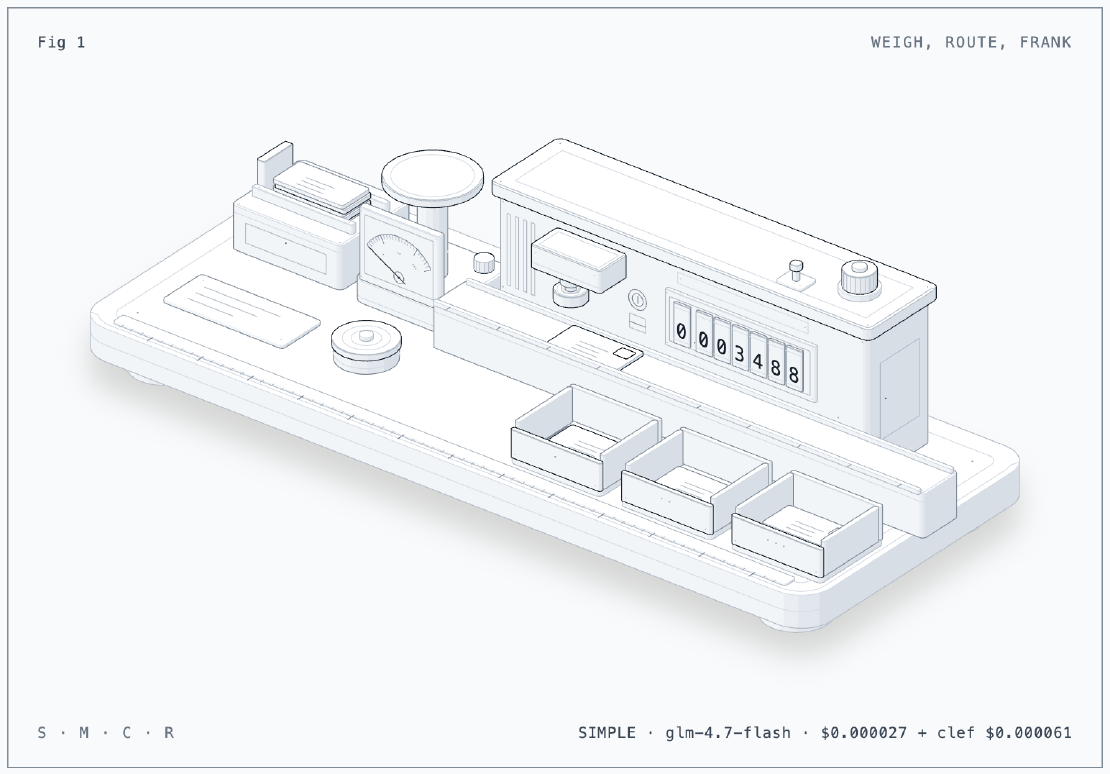
The Figure
The figure is a letter scale and franking machine, because that is what the
gateway does to every request: weigh it, send it to the right tray, and stamp
its cost on it. Letters wait on the feed table at the left. The scale is the
clef classifier. Each letter is lifted onto the pan, and the needle swings
into the zone marked with one, two or three dots (simple, medium or
complex). The letter then runs along the bed of the franking machine, and the
die stamps it. The seven register drums on the front add its price plus the
price of the classifier to the month’s spend. It ends up in the tray at the
front with the same number of dots. Press S, M or C to post a simple,
medium or complex letter. Click the feed table to post the next one. Press
R to reset the register. Drawn with the anatomy skill
(GitHub: wheresryan22/anatomy).
The Situation
- k0s 1.36.4 on three Proxmox hosts. Flux owns every app, and secrets come from OpenBao through External Secrets.
- CloudNativePG cluster
pgwith TLS from the lab root CA. - OTel collectors in front of VictoriaMetrics and VictoriaLogs (Part 28).
- LiteLLM v1.105.1, still the Python (FastAPI) proxy. A Rust rewrite is under way upstream, with the full server targeted for December 2026. It reads the same YAML config, so I expect mine to carry over.
flowchart LR
  S[Homelab service<br/>virtual key] --> L[LiteLLM<br/>ns litellm]
  L -->|smart| C[clef classifier]
  C --> L
  L -->|one token| CF[Workers AI<br/>OpenAI-compatible API]
  L --> PG[(Postgres<br/>keys, spend)]
  L --> OT[OTel collector] --> VM[(VictoriaMetrics)]
Setup
Why Workers AI only
Cloudflare offers two ways in. Workers AI runs models on Cloudflare’s own
GPUs (the @cf/... IDs) and bills them as Workers usage. AI Gateway Unified
Billing proxies third-party models (OpenAI, Anthropic, Google, xAI) at list
price with no token markup, but takes a 5% fee when you buy credits. I do not
need top-tier models for homelab automation, so I started with Cloudflare’s
own catalog and skipped Unified Billing.
The Cloudflare side is a single API token with Account > Workers AI > Read, nothing else. Every model uses the same OpenAI-compatible endpoint:
https://api.cloudflare.com/client/v4/accounts/<account-id>/ai/v1
@cf/... models also need a cf-aig-gateway-id header. The value default
works.
The models
| Name | Workers AI model | Price per 1M in / out | Tier in smart |
|---|---|---|---|
glm-4.7-flash | @cf/zai-org/glm-4.7-flash | $0.06 / $0.40 | SIMPLE |
glm-5.3-flash | @cf/zai-org/glm-5.3-flash | $0.15 / $0.50 | MEDIUM |
deepseek-v4-pro | @cf/deepseek-ai/deepseek-v4-pro-0813 | $1.32 / $3.96 | MEDIUM |
qwq-32b | @cf/qwen/qwq-32b | $0.66 / $1.00 | MEDIUM |
kimi-k2.6 | @cf/moonshotai/kimi-k2.6 | $0.95 / $4.00 | COMPLEX, REASONING |
kimi-k2.7-code | @cf/moonshotai/kimi-k2.7-code | $0.95 / $4.00 | COMPLEX, REASONING |
glm-5.3 | @cf/zai-org/glm-5.3 | $1.40 / $4.40 | COMPLEX, REASONING |
clef | @cf/cloudflare/clef | $0.24 / $0 | classifier |
Clients call a model by its short name. Moving glm-5.3 to another provider
later means changing its model, api_base and api_key. The name and every
client key stay the same.
One YAML anchor per provider
All Workers AI entries share one block through a YAML anchor:
model_list:
  - model_name: glm-4.7-flash
    litellm_params: &cf
      model: openai/@cf/zai-org/glm-4.7-flash
      api_base: os.environ/CF_AI_BASE
      api_key: os.environ/CLOUDFLARE_API_KEY
      extra_headers:
        cf-aig-gateway-id: default
    model_info: {input_cost_per_token: 6.0e-8, output_cost_per_token: 4.0e-7}
  - model_name: glm-5.3
    litellm_params: {<<: *cf, model: openai/@cf/zai-org/glm-5.3}
    model_info: {input_cost_per_token: 1.4e-6, cache_read_input_token_cost: 2.6e-7, output_cost_per_token: 4.4e-6}
The openai/ prefix tells LiteLLM to speak the OpenAI protocol to whatever
api_base says. The model_info prices matter: LiteLLM looks costs up in
its built-in map by model ID, and openai/@cf/zai-org/glm-5.3 is not in it.
Without model_info, LiteLLM logs every call as $0. A gateway whose job is
counting money then counts nothing.
The smart model
smart is LiteLLM’s auto_router/complexity_router. I point its JEV
classifier at a model in my own list. The router then asks clef how hard the
prompt is and sends it to one model from that tier:
- model_name: smart
  litellm_params:
    model: auto_router/complexity_router
    complexity_router_config:
      classifier_type: jev
      jev_classifier_config:
        deployment_name: clef
      tiers:
        SIMPLE: [glm-4.7-flash]
        MEDIUM: [glm-5.3-flash, deepseek-v4-pro, qwq-32b]
        COMPLEX: [kimi-k2.6, kimi-k2.7-code, glm-5.3]
        REASONING: [kimi-k2.6, kimi-k2.7-code, glm-5.3]
If clef fails or takes longer than 3 seconds, a circuit breaker opens for
30 seconds. The router then falls back to a keyword heuristic, so a
classifier outage slows nothing down.
Shipping it with Flux
- Chart: I found no registry that publishes
litellm-helm1.1.3. So Flux reads it straight from the LiteLLM repository, with aGitRepositoryat tagv1.105.1and a sparse checkout ofhelm/litellm-helm. The image is pinned by digest and verified with the repository’scosign.pub. - Database: a
litellmdatabase and role on CNPG. Prisma connects withsslmode=require&sslcert=/etc/lab-ca/ca.crt&sslaccept=strict, so it checks the server certificate against the lab CA. I was not sure that Prisma accepts that. It did on the first try. - Secrets: the Cloudflare token, master key and salt key come from OpenBao.
The ExternalSecret template runs
trimon the token, because the first copy I stored had a trailing newline from stdin. - Egress: a CiliumNetworkPolicy allows only
api.cloudflare.com:443, the Postgres pods, the OTel collector and DNS. - Access: the UI at
https://litellm.franzramadhan.labthroughlab-gateway, and on the tailnet through a Tailscale Ingress. The API is in-cluster only. - Budget:
max_budget: 50per30dfor the whole proxy. Each service will get a virtual key with its own smaller budget. - Metrics: the
otelcallback withLITELLM_OTEL_INTEGRATION_ENABLE_METRICS=true. LiteLLM sends spans too, so the collector got a traces pipeline that exports tonop: accept and drop, instead of rejecting every export.
Issue 1: The Migration Job Died Without a Word
Symptom
Flux reported the install as failed before the proxy ever started:
Helm install failed for release litellm/litellm with chart litellm-helm@1.1.3:
failed pre-install: failed early due to stalled resources:
[Job/litellm/litellm-migrations status: 'Failed']
By then the Job and its pods were gone, so kubectl logs had nothing. The
logs were still in VictoriaLogs, and they looked like success. Every attempt
applied or confirmed the migrations and then stopped:
# k8s.container.name:prisma-migrations
195 migrations found in prisma/migrations
No pending migrations to apply.
litellm_proxy_extras - INFO - Request-log indexes are all in place
No error, no traceback, and four attempts with the same ending.
Dead end: the TLS connection string
That sslaccept=strict URL was the change I trusted least, so it was my first
suspect. The logs ruled it out: Prisma printed
Datasource "client": PostgreSQL database "litellm" ... at "pg-rw.databases.svc:5432"
and applied 195 migrations on the first attempt. The database side was fine.
Cause
A container that stops mid-run without logging anything is usually killed from outside. The exit reason only exists while the pod does, so I forced a retry and watched the pod’s status:
kubectl -n litellm get pods -l job-name=litellm-migrations -o json \
  | jq '.items[].status.containerStatuses[].lastState.terminated'
# {"exitCode": 137, "reason": "OOMKilled", ...}
The chart’s migration Job runs litellm/proxy/prisma_migration.py. That
script starts with run_server(("--skip_server_startup",), ...). It loads the
entire proxy, config and all, only to run the migrations and exit. With my
1 GiB limit, it finished the migrations and then got killed while the rest of
the proxy was still loading.
Fix
2 GiB limit for the migration Job and the proxy (1 GiB request for the proxy):
migrationJob:
  resources:
    requests: {cpu: 100m, memory: 512Mi}
    limits: {cpu: "1", memory: 2Gi}
The next upgrade went through.
Issue 2: The Corrupt Layer That Did Not Leave
Symptom
The Tailscale Ingress for the UI never got a hostname. Its proxy pod was in
CrashLoopBackOff on k0s-pve-01-worker-1:
# kubectl -n tailscale logs ts-litellm-...-0 --previous
exec /usr/local/bin/containerboot: exec format error
Same image (tailscale/tailscale:v1.102.4), same node, same error as the
tailnet DNS proxy in
Part 28, one day earlier.
Dead end: deleting the image
In Part 28 I deleted the cached image and the pod recovered. This time I did
the same and the pod still failed. (k0s 1.36 has no crictl subcommand. The
working command is k0s ctr -n k8s.io.)
k0s ctr -n k8s.io images rm docker.io/tailscale/tailscale:v1.102.4
kubectl -n tailscale delete pod ts-litellm-...-0
# exec /usr/local/bin/containerboot: exec format error
So I looked at the binary itself, inside containerd’s overlayfs snapshots:
find /opt/lib/k0s/containerd/io.containerd.snapshotter.v1.overlayfs/snapshots \
  -path '*/usr/local/bin/containerboot' -exec ls -l {} \;
# -r-xr-xr-x 1 root root 0 Jan  1  1970 .../snapshots/1099/fs/usr/local/bin/containerboot
Zero bytes. The 1970 date is normal for this image (it is built with fixed timestamps). The size is the problem. The kernel cannot recognize an empty file as anything, so it reports “exec format error”. The snapshot directory was created on 2026-10-13 at 20:42, the night pve-01 crashed (Part 27). The layer was unpacked before the crash, and its file contents never reached the disk.
Cause
Deleting an image removes the image record. The unpacked layer is a separate
snapshot, and containerd keeps it while anything still references it. Every
re-pull matched the same layer digest, found the snapshot already “unpacked”,
and reused the empty files. Even images rm --sync after moving the pod away
left snapshot 1099 in place, and a fresh ctr images pull created no new
snapshot at all.
That also explains Part 28: the DNS proxy recovered because it was rescheduled onto another worker, not because the image delete fixed anything.
Fix
Find the layer’s snapshot key, then delete the snapshot itself:
k0s ctr -n k8s.io image usage --snapshotter overlayfs docker.io/tailscale/tailscale:v1.102.4
# KEY                                                                     SIZE     INODES
# sha256:853c7f02ac0ee4720c379dc50ce7b250bae88c8a77d660c57ecfbafa5b1c1c8f 97.6 MiB 7
# ...
k0s ctr -n k8s.io images rm docker.io/tailscale/tailscale:v1.102.4
k0s ctr -n k8s.io snapshots rm sha256:853c7f02ac0ee4720c379dc50ce7b250bae88c8a77d660c57ecfbafa5b1c1c8f
k0s ctr -n k8s.io images pull docker.io/tailscale/tailscale:v1.102.4
# -r-xr-xr-x 1 root root 26249110 Jan  1  1970 .../snapshots/1870/fs/usr/local/bin/containerboot
The 7-inode layer is the one that holds the Tailscale binaries. After the delete
and a fresh pull, a new snapshot (1870) had a 26 MB containerboot, and 1099
was gone. I scanned every other snapshot on that worker for empty executables
and found none. The UI answered on the tailnet with HTTP 200.
Results
Each model got the same prompt (“Reply with the single word pong”). Times are LiteLLM’s own request durations from its spend log, in whole seconds:
| Model | Answer | Time | Tokens | Cost |
|---|---|---|---|---|
glm-4.7-flash | pong | 5 s | 139 | $0.000052 |
glm-5.3-flash | pong | 9 s | 59 | $0.000023 |
deepseek-v4-pro | pong | 1 s | 119 | $0.000234 |
qwq-32b | its reasoning, in content | 5 s | 137 | $0.000132 |
kimi-k2.6 | pong | 7 s | 99 | $0.000353 |
kimi-k2.7-code | pong | 2 s | 49 | $0.000153 |
glm-5.3 | pong | 12 s | 285 | $0.001200 |
smart (clef, then glm-4.7-flash) | pong | 2 s + 2 s | 253 + 77 | $0.000061 + $0.000027 |
smartsent the trivial prompt to the SIMPLE tier, as expected. The classifier call (253 tokens, $0.000061) cost more than twice the answer ($0.000027). For short prompts,smartis the expensive way to ask.qwq-32bputs its reasoning intocontent. The others return it separately inreasoning_content.- With
max_tokens: 300,smartonce returnedcontent: null: the reasoning used up the whole budget before any answer. Reasoning models need room. - Total spend for all testing: $0.0034 of the $50 budget.
- VictoriaMetrics receives
gen_ai_client_operation_duration_seconds,gen_ai_client_token_usageandgen_ai_usage_cost_USD, so cost per model can go on a dashboard next to everything else. - The edge probes from Part 28 now include
https://litellm.franzramadhan.lab/health/liveliness.
Update 2026-10-18: SSO for the admin UI
The admin UI still used one shared login: user admin, with the master key as
the password. OpenBao (Part 19), Headlamp (Part 20) and Proxmox (Part 30)
already log me in through Cloudflare Access and Google, so LiteLLM was the
odd one out.
I assumed that SSO was an Enterprise feature, so I left it out. At this size,
it is not: v1.105.1 allows SSO for up to five users without a license. The
check is in ui_sso.py:
async def _raise_if_sso_exceeds_free_user_limit(premium_user, prisma_client):
    """Free tier allows SSO for up to 5 billable users; beyond that requires an Enterprise license."""
Setup
It is the same pattern as the other three. I made a Cloudflare Access SaaS
application with OIDC and the redirect URL
https://litellm.<tailnet>.ts.net/sso/callback. Its policy only lets my
email in. The client ID and secret go to
OpenBao, and the ExternalSecret builds the three endpoint URLs from the
client ID:
GENERIC_CLIENT_ID: "{{ .sso_id | trim }}"
GENERIC_CLIENT_SECRET: "{{ .sso_secret | trim }}"
GENERIC_AUTHORIZATION_ENDPOINT: "https://<team>.cloudflareaccess.com/cdn-cgi/access/sso/oidc/{{ .sso_id | trim }}/authorization"
GENERIC_TOKEN_ENDPOINT: "https://<team>.cloudflareaccess.com/cdn-cgi/access/sso/oidc/{{ .sso_id | trim }}/token"
GENERIC_USERINFO_ENDPOINT: "https://<team>.cloudflareaccess.com/cdn-cgi/access/sso/oidc/{{ .sso_id | trim }}/userinfo"
The rest is plain configuration:
envVars:
  PROXY_BASE_URL: https://litellm.<tailnet>.ts.net
  GENERIC_SCOPE: openid email profile
  GENERIC_USER_ID_ATTRIBUTE: email
  PROXY_ADMIN_ID: <my email>
proxy_config:
  general_settings:
    ui_access_mode: admin_only
    disable_env_credential_login: true
- Cloudflare Access sends no role claim.
PROXY_ADMIN_IDmakes the user whose ID (here, the email) matches it aproxy_admin. ui_access_mode: admin_onlykeeps any other login out of the UI.- The token exchange runs inside the pod, so the egress policy got one more
name:
<team>.cloudflareaccess.com. - With SSO working, the UI warned that “environment-credential login is
enabled”: the master key still opened the UI as admin. Setting
general_settings.disable_env_credential_login: trueclosed that path. The master key still works on the API (Authorization: Bearer), and that is now the break-glass path (emergency access). The flag goes back tofalseonly if I need the UI while Cloudflare Access is down.
Two snags
The first login stopped at Cloudflare:
{
  "error": "invalid_request",
  "error_description": "Invalid redirect_uri - does not match configured values"
}
A typo in the app’s redirect URL. LiteLLM always sends
${PROXY_BASE_URL}/sso/callback, even when the login starts on the LAN name,
so that one exact string is what the app must list.
The second login worked, landed on /ui/?login=success, and the user row
came out right:
<my email>|proxy_admin
Right behind it, the proxy logged eight key lookup did not answer within 10s
errors in the same second. I first blamed the creation of the new user. The
next morning, the same burst came back on the first UI load, and that ruled it
out. The log line just before the burst gave the real cause:
LiteLLM: Failed to fetch blog posts from https://docs.litellm.ai/blog/rss.xml: timed out
The login page asks the proxy for LiteLLM’s latest blog posts, and the proxy
fetches them with a synchronous httpx.get. The egress policy blocks that
host, so the whole event loop waited for the timeout. Every key lookup that
the UI sent in parallel missed its 10-second deadline. One setting skips the
fetch and uses the posts bundled in the image:
envVars:
  LITELLM_LOCAL_BLOG_POSTS: "True"
With it, the blog call answers in 0.04 seconds and the errors are gone. Any LiteLLM behind a strict egress policy will hit this.
Lessons
- A gateway that counts money needs prices for every model. LiteLLM
only knows costs for model IDs in its built-in map. Proxied or renamed
models need
model_info, or spend reads $0. - A container that dies without logging was probably killed. Check
lastState.terminatedwhile the pod still exists. When a Job is deleted, the exit reason goes with it. - Read what the migration Job runs. This one boots the whole proxy, so it needs the proxy’s memory, not a script’s.
- Deleting an image does not delete its layers. If a binary is broken on one node, check its size in the snapshot, then remove the snapshot by key.
- A fix that works because the pod moved is not a fix. Part 28’s “fix” hid the corrupt layer for a day.
- A classifier is not free. For short prompts, calling the cheapest model
directly costs less than letting
smartdecide.
Series
This post is part of Homelab Rebuild:
- Part 1: Upgrading Proxmox VE 8 to 9
- Part 2: Starting Over When the IaC Is Broken
- Part 3: When Tailscale Breaks Your Cilium Gateway
- Part 4: Living on the Tailnet
- Part 5: Secrets Without Secrets in Git
- Part 6: Certificates, DNS and a Private CA
- Part 7: Self-Hosted CI and Getting Back to IaC
- Part 8: Stateful Workloads on Unequal Hardware
- Part 9: Going Public Safely with Cloudflare Tunnel
- Part 10: When the Hypervisor Went Quiet
- Part 11: Hardening the Cluster in Five Layers
- Part 12: Observability with Coroot, and Losing pve-01
- Part 13: The Host That Kept Losing Power
- Part 14: Observability, Take Two with OpenTelemetry
- Part 15: Requests and Limits for Everything
- Part 16: Handing the Cluster to FluxCD
- Part 17: Making the Guardrails Earn Their Keep
- Part 18: When the API Server Outgrew Its VM
- Part 19: Logging In to OpenBao with Cloudflare Access and Google
- Part 20: Headlamp SSO, or Teaching kube-apiserver to Trust Cloudflare Access
- Part 21: pve-02 Loses Power, and Pi-hole Has Nowhere to Go
- Part 22: Turning Four Days of Fixes into AI Runbooks
- Part 23: microVM Sandboxes on Proxmox
- Part 24: Pi-hole Without a Home Host
- Part 25: It Was the Router
- Part 26: TLS on the Front, Plaintext Behind It
- Part 27: One Bad Power Adapter, Two Different Deaths
- Part 28: Observability, Take Three: Making It Worth Looking At
- Part 29: One Meter for Every Model, LiteLLM on Workers AI (this post)
- Part 30: Proxmox Joins the SSO, and a Plan Token Loses Admin
- Part 31: First Backups, Postgres, OpenBao and etcd to R2
- Part 32: Alerts That Reach Me, Even When the Lab Is Dead
- Part 33: The Firewall Held, the Tailnet Did Not
- Part 34: From Watching to Blocking, and a Record of Who Did What
- Part 35: Wazuh Without the 8 GB, Endpoint Security for One Mac and Three Hosts
- Part 36: The Fans Were Loud, the CPUs Were Idle
- Part 37: A Power Trip, a Search Domain and a Wildcard
- Part 38: An Autonomous AI Pentester in a Sealed Box
- Part 39: Wasm Pods on k0s, and the Label That Kept Them Packed
References
- GitHub: wheresryan22/anatomy
- LiteLLM: Proxy configuration
- LiteLLM: Custom pricing
- LiteLLM: Helm chart
- GitHub: BerriAI/litellm#31263, Rust migration
- Cloudflare: Workers AI models
- Cloudflare: Workers AI OpenAI-compatible endpoints
- Flux: GitRepository sparse checkout
- containerd: ctr snapshots
- Kubernetes: Debug running pods