Intro
OpenBao (Part 19) and Headlamp (Part 20) already log me in through Cloudflare
Access and Google. The Proxmox UI was the odd one out: root@pam and a
password. My browser flagged the page as “Not Secure”, because port 8006
served a certificate from Proxmox’s own CA.
When I checked the access list for the new login, I found a second problem.
The token that Terraform uses for plans had full Administrator rights.
TL;DR: Proxmox VE 9 has an OpenID realm type (a realm is a login source). One realm
cfpoints at a Cloudflare Access SaaS app and covers all three nodes, with one pre-created user and no auto-creation.tailscale certpluspvenode cert setgives each node a Let’s Encrypt certificate for its tailnet name, renewed by a weekly timer. The plan token lostAdministrator, but read-only was not enough. It needsVM.Config.Disktoo.
The Figure
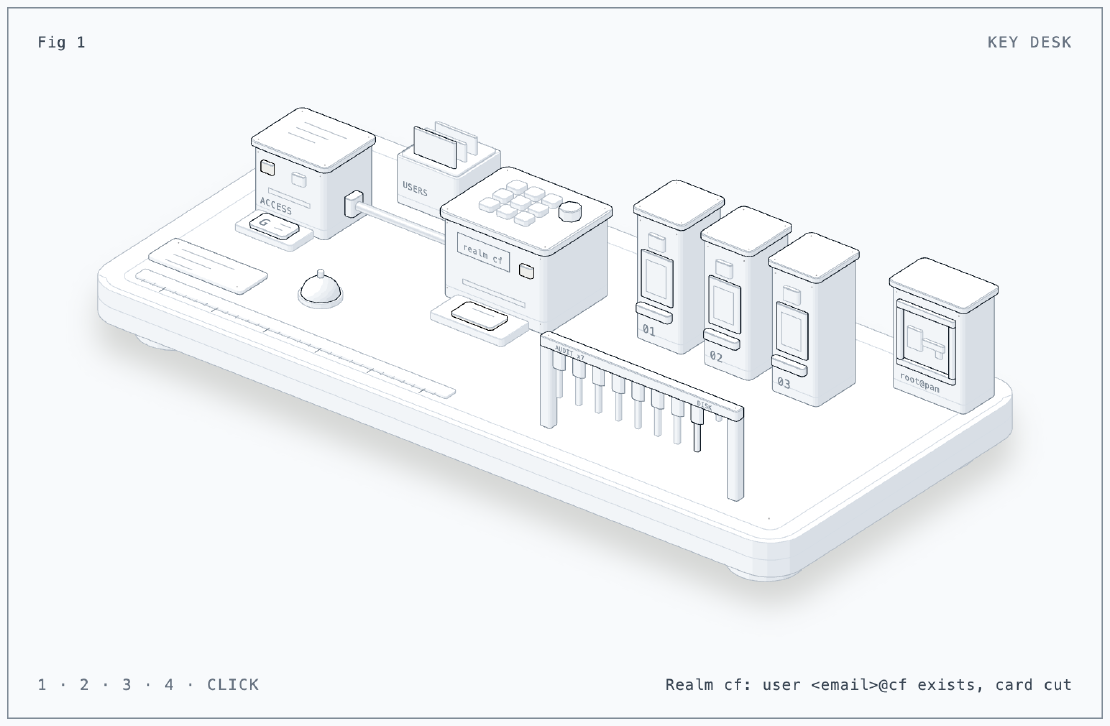
The figure is a hotel key desk, because that is what the new login is. The ID
reader at the left is Cloudflare Access. It checks the guest’s Google badge
and lights pass or deny. Behind it, the card file holds the pre-created users,
and there is one card in it. The encoder in the middle is the realm cf. It
cuts a key card only for a guest who passed the reader and also has a card in
the file. That one card opens all three doors, pve-01 to pve-03. The
master key behind glass at the back is root@pam. The rail in front is the
plan token after Issue 1: seven audit keys, one disk key and an empty hook.
Press 1 for my login, 2 for another Google account, 3 to break the glass and
4 for the rail. You can also click to step through them. I built it with the
anatomy skill.
The Situation
- Proxmox VE 9.2.21 on
pve-01,pve-02andpve-03, one cluster - Realms before:
pamandpveonly - I open the UI at
https://pve-0X.<tailnet>.ts.net:8006, never by LAN IP - Cloudflare Zero Trust team
<team>.cloudflareaccess.com, Google as the identity provider, same as Parts 19 and 20 - Terraform (bpg/proxmox) runs in CI with two API tokens:
terraform-plan@pve!githubandterraform-apply@pve!github
Setup
The login flow
sequenceDiagram
  participant B as Browser
  participant P as pveproxy :8006
  participant C as Cloudflare Access
  participant G as Google
  B->>P: Login, realm cf
  P-->>B: redirect to issuer (redirect_uri = browser origin)
  B->>C: authorize
  C->>G: sign in
  G-->>C: identity
  C-->>B: redirect back with code
  B->>P: code
  P->>C: exchange code for ID token
  P-->>B: session as <email>@cf
Proxmox talks to Cloudflare only for the code exchange. Everything else goes through the browser. This fact matters for the redirect URLs below.
Step 1: The Cloudflare side
In Zero Trust: Access, Applications, Add an application, SaaS, protocol
OIDC. Scopes openid, email, profile. Login method Google, and a
policy that allows only my email address.
The redirect URLs need care. Proxmox sends the browser’s origin as the
redirect_uri. So the app must list every URL that I type into the address
bar, exactly, with the port and without a path:
https://pve-01.<tailnet>.ts.net:8006
https://pve-02.<tailnet>.ts.net:8006
https://pve-03.<tailnet>.ts.net:8006
Before using the issuer URL, I checked its discovery document:
curl -s "$ISSUER/.well-known/openid-configuration" \
  | python3 -c "import json,sys;d=json.load(sys.stdin);print(d['issuer']==\"$ISSUER\", d['scopes_supported'])"
# True ['openid', 'email', 'profile']
The client ID and secret went straight into OpenBao at
secret/proxmox/oidc. I entered them at a silent read -s prompt, so they
never showed up in a terminal or a chat.
Step 2: The realm
Realm config lives in /etc/pve, and the cluster file system replicates that
directory. So one command on pve-01 covers all three nodes. The secret comes from
OpenBao over SSH stdin:
bao kv get -format=json secret/proxmox/oidc \
  | python3 -c "import json,sys;d=json.load(sys.stdin)['data']['data'];print(d['client_id']);print(d['client_secret'])" \
  | ssh root@pve-01 'read -r CID; read -r CSEC
      pveum realm add cf --type openid --issuer-url "$ISSUER" \
        --client-id "$CID" --client-key "$CSEC" \
        --username-claim email --scopes "openid email profile" \
        --autocreate 0 --comment "Cloudflare Access (Google)"'
--username-claim emailmakes the user<email>@cfinstead of an opaque subject ID.--autocreate 0: a valid Google login is not enough. The user must exist.
Then the one user and its rights:
pveum user add <email>@cf --comment "SSO via Cloudflare Access"
pveum acl modify / --users <email>@cf --roles Administrator
My Claude Code session prepared that last command. Its permission classifier refused to grant Administrator on its own, so I ran it myself. That is the right call for a command that creates a new full admin.
root@pam stays as the break-glass login (emergency access). API tokens and
SSH do not touch the realm, so Terraform, the exporter and qm over SSH work
as before.
Step 3: Real certificates on port 8006
Each node already had Tailscale HTTPS certificates enabled for its tailnet name. A small script fetches the certificate and hands it to Proxmox:
tailscale cert --cert-file "$dir/cert.pem" --key-file "$dir/key.pem" "$name"
if ! cmp -s "$dir/cert.pem" /etc/pve/local/pveproxy-ssl.pem; then
  pvenode cert set "$dir/cert.pem" "$dir/key.pem" --force 1 --restart 1
fi
tailscale cert reuses the cached certificate until it gets close to expiry.
pveproxy restarts only when the file changed. A systemd timer runs it
every Monday at 10:00 WIB. Let’s Encrypt certificates last 90 days, so a
weekly run leaves plenty of retries.
Things I checked before rolling it past pve-03:
- Right after the restart,
openssl s_clientstill showed the old Proxmox CA certificate. A few seconds later it showed Let’s Encrypt. The restart is not instant. - Requests proxied between nodes still work:
pvesh get /nodes/pve-03/statusfrompve-01answered after the swap. - Terraform (
insecure = true) and the PVE exporter (verify_ssl: false) connect by LAN IP and skip verification, so the new certificate cannot break them.
Result
| Node | Realm cf | Cert timer | :8006 certificate |
|---|---|---|---|
| pve-01 | present | enabled | Let’s Encrypt, verifies |
| pve-02 | present | enabled | Let’s Encrypt, verifies |
| pve-03 | present | enabled | Let’s Encrypt, verifies |
Login with realm cf works on all three URLs. Chrome kept showing “Not
Secure” for a while. It remembered the exception that I clicked through for
the old self-signed certificate. A browser restart cleared it, and curl
showed that the chain was fine all along (ssl_verify_result 0).
Issue 1: A plan token with Administrator
Symptom
pveum acl list while adding the new user:
/  Administrator  user  terraform-apply@pve
/  Administrator  user  terraform-plan@pve
/  PVEAuditor     user  terraform-plan@pve
The token that only runs terraform plan on pull requests was able to
create, change or delete anything in the cluster.
Cause
A leftover from Part 7. The old Telmate provider failed with a missing
VM.Monitor privilege, and I added Administrator while I chased that
error. It did not help: Proxmox VE 9 removed VM.Monitor, so not even
Administrator has it. A provider bump fixed the error, and nobody took the
extra role back. The tokens use privsep=0, so each one has exactly its
user’s rights.
First try: read-only
The plan only reads VMs, storage and the guest agent’s network data, so
PVEAuditor alone looked like enough:
pveum acl delete / --users terraform-plan@pve --roles Administrator
pveum user permissions terraform-plan@pve --path /vms/101
# Datastore.Audit, Mapping.Audit, Pool.Audit, SDN.Audit,
# Sys.Audit, VM.Audit, VM.GuestAgent.Audit
To prove it, I opened a comment-only pull request, and CI ran a real plan. It failed on every VM disk:
Error: error get file local-lvm:vm-401-disk-0 from datastore local-lvm:
received an HTTP 403 response - Reason: Permission check failed
(/vms/401, VM.Config.Disk)
The bpg provider reads each disk volume during refresh. For a volume that
belongs to a VM, Proxmox checks VM.Config.Disk on that VM. That privilege
is meant for changing disks. No read-only role includes it.
Fix
A custom role with the auditor privileges plus that one:
pveum role add TerraformPlan --privs "Datastore.Audit,Mapping.Audit,Pool.Audit,SDN.Audit,Sys.Audit,VM.Audit,VM.GuestAgent.Audit,VM.Config.Disk"
pveum acl modify / --users terraform-plan@pve --roles TerraformPlan
pveum acl delete / --users terraform-plan@pve --roles PVEAuditor
The re-run plan passed with No changes.
It is not read-only. The plan token can still add, detach or resize VM disks.
But it can no longer create or delete VMs, power them on or off, or touch
users and tokens. The apply token keeps Administrator for now.
Lessons
- OIDC redirect URLs are browser origins. Proxmox builds the
redirect_urifrom the address bar, so list every name you type, port included. - Turn off auto-create. With one pre-created user, a valid login at the identity provider still is not enough to get into the cluster.
- Tailscale already issues real certificates. If you reach a host by its
tailnet name,
tailscale certis the shortest way to drop the self-signed warning. - Prove least privilege with a real run. “A plan only reads” was wrong for this provider. The CI plan found the missing privilege in a minute.
- Read the ACL list when you touch auth. The over-privileged plan token sat there for six days. I only saw it because I added a user next to it.
Series
This post is part of Homelab Rebuild:
- Part 1: Upgrading Proxmox VE 8 to 9
- Part 2: Starting Over When the IaC Is Broken
- Part 3: When Tailscale Breaks Your Cilium Gateway
- Part 4: Living on the Tailnet
- Part 5: Secrets Without Secrets in Git
- Part 6: Certificates, DNS and a Private CA
- Part 7: Self-Hosted CI and Getting Back to IaC
- Part 8: Stateful Workloads on Unequal Hardware
- Part 9: Going Public Safely with Cloudflare Tunnel
- Part 10: When the Hypervisor Went Quiet
- Part 11: Hardening the Cluster in Five Layers
- Part 12: Observability with Coroot, and Losing pve-01
- Part 13: The Host That Kept Losing Power
- Part 14: Observability, Take Two with OpenTelemetry
- Part 15: Requests and Limits for Everything
- Part 16: Handing the Cluster to FluxCD
- Part 17: Making the Guardrails Earn Their Keep
- Part 18: When the API Server Outgrew Its VM
- Part 19: Logging In to OpenBao with Cloudflare Access and Google
- Part 20: Headlamp SSO, or Teaching kube-apiserver to Trust Cloudflare Access
- Part 21: pve-02 Loses Power, and Pi-hole Has Nowhere to Go
- Part 22: Turning Four Days of Fixes into AI Runbooks
- Part 23: microVM Sandboxes on Proxmox
- Part 24: Pi-hole Without a Home Host
- Part 25: It Was the Router
- Part 26: TLS on the Front, Plaintext Behind It
- Part 27: One Bad Power Adapter, Two Different Deaths
- Part 28: Observability, Take Three: Making It Worth Looking At
- Part 29: One Meter for Every Model, LiteLLM on Workers AI
- Part 30: Proxmox Joins the SSO, and a Plan Token Loses Admin (this post)
- Part 31: First Backups, Postgres, OpenBao and etcd to R2
- Part 32: Alerts That Reach Me, Even When the Lab Is Dead
- Part 33: The Firewall Held, the Tailnet Did Not
- Part 34: From Watching to Blocking, and a Record of Who Did What
- Part 35: Wazuh Without the 8 GB, Endpoint Security for One Mac and Three Hosts
- Part 36: The Fans Were Loud, the CPUs Were Idle
- Part 37: A Power Trip, a Search Domain and a Wildcard
- Part 38: An Autonomous AI Pentester in a Sealed Box
- Part 39: Wasm Pods on k0s, and the Label That Kept Them Packed