Intro
One VM on pve-01 is not mine. I host it for a partner: it lives outside the cluster, it is off overnight like the rest of the lab, and the partner reaches it over Tailscale. When I set it up, I put a Proxmox firewall group on its NIC so it could not talk to anything else in my home network.
This morning I wanted to check that it really could not. I expected a short “yes, it is isolated” and got half of one.
TL;DR: The Proxmox firewall held: from inside the VM, every LAN host was closed. But the VM was also on my tailnet, logged in as my own user, and my policy still had the default allow-all grant,
"src": ["*"]. Over Tailscale it could open the cluster API, SSH on the nodes, Grafana, LiteLLM and my laptop. Tagging the VM did not help on its own, because"*"matches tagged devices too. The fix was atag:sandboxtag and an allow-all grant whosesrclists who may connect, plus policy tests that fail the save if the sandbox ever gets a path back. The share to the partner kept working.
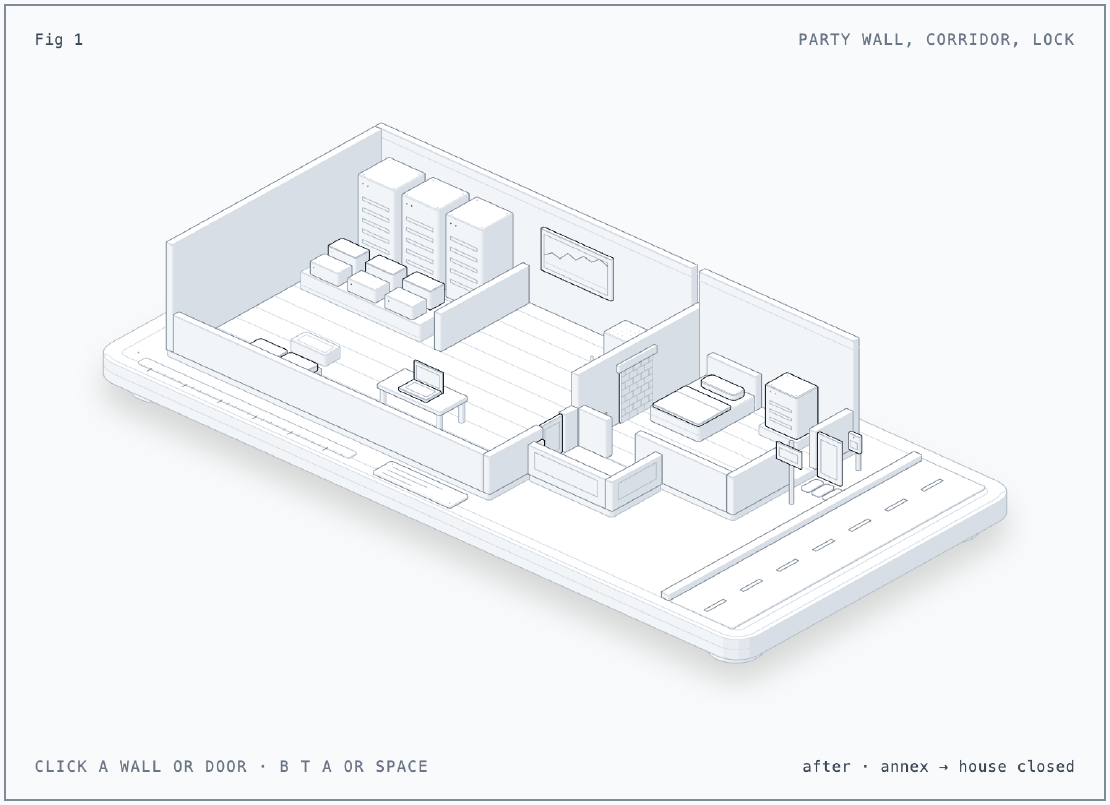
The Figure
The figure is my lab drawn as a house with a guest annex. The main house is
the homelab: the Proxmox hosts at the back, the k0s controllers and workers
on the bench, Grafana on the wall, LiteLLM, and my laptop on the desk. The
annex is the partner’s guest VM, and its street door (the internet) is open
both ways. The party wall between them is the LAN: its old doorway is bricked
up by the Proxmox firewall group block-local, with a small slot left for
DNS to the router, and that wall held. The corridor is the tailnet, and that
is where it leaked. Press B, T or A (or the buttons under the card) to switch
between before, tag only and after, and click a wall, a door, the sign or the
visitor pass to list which probes get through. Putting a tag:sandbox sign
on the annex changes nothing, because "*" in a grant also matches tagged
devices. After the fix, the corridor door only opens from the house side,
and the partner reaches the annex with a visitor pass (a node share) from
their own tailnet. I built it with the anatomy skill (see References).
The Situation
- Proxmox VE 9.2 on three hosts, the guest VM on pve-01, bridged on
vmbr0with the Proxmox firewall on (firewall=1). - Tailscale 1.102.2 in the VM. The partner reaches it through a node share to their own account.
- The tailnet policy from Part 4: one allow-all IP grant and the Kubernetes operator grant. It is edited in the admin console, not in git.
- The k0s nodes, Grafana, LiteLLM and Headlamp are all on the same tailnet (Parts 4, 28 and 29).
To test from the VM’s point of view without logging in to it, I used the QEMU
guest agent from the host and bash’s /dev/tcp:
qm guest exec <vmid> --timeout 8 -- \
  timeout 4 bash -c 'echo > /dev/tcp/<host>/<port> && echo OPEN || echo CLOSED'
Issue 1: Is the LAN Really Walled Off?
Symptom
None, which is the point of checking. The VM’s firewall file only pulls in a cluster-wide group:
# /etc/pve/firewall/<vmid>.fw
[OPTIONS]
enable: 1
[RULES]
GROUP block-local
Cause
The group in cluster.fw allows DNS to the router and drops the home ranges
(two more ranges like the last line are left out here):
[group block-local]
IN ACCEPT -log nolog
OUT DROP -dest 192.168.101.200 -p tcp -dport 80 -log nolog
OUT DROP -dest 192.168.101.200 -p tcp -dport 443 -log nolog
OUT ACCEPT -dest 192.168.101.200/32 -log nolog
OUT DROP -dest 192.168.101.0/24 -log nolog
Rules are checked top to bottom, so the router answers DNS but not its admin pages, and the rest of the subnet is dropped.
Fix
Nothing to fix. From inside the VM:
| Target | Result |
|---|---|
The three Proxmox hosts, :22 | closed |
Router, :443 | timed out (dropped) |
Router, :53 | open |
Internet, 1.1.1.1:443 | open |
Dead end: IPv6
Every rule above is IPv4. If the VM had a path over IPv6, the group would not
see it. It has no global IPv6 address on its LAN interface, and a ping to
all nodes on the link (ping -6 ff02::1%ens18) was answered only by itself.
No IPv6 path today. Worth repeating if the router ever starts handing out
IPv6.
Issue 2: The Tailnet Was a Second Door
Symptom
tailscale status in the VM listed every machine I own: the Proxmox hosts
(each offering an exit node), all eight k0s nodes, the Tailscale operator’s
devices and my laptop. The owner column showed my user, not a tag. So I tried
the same probes over tailnet addresses:
| Target over the tailnet | Result |
|---|---|
A controller, :22 | open |
A controller, :6443 (Kubernetes API) | open |
A worker, :22 | open |
Grafana, :443 | open |
LiteLLM, :443 | open |
My laptop, :22 | open |
The firewall group did its job on this traffic too, and it did not matter.
Tailscale first tries a direct WireGuard path to the peer’s LAN address,
which block-local drops. It then falls back to a DERP relay on the
internet (tailscale status showed relay "sin" for the worker), and UDP
to the internet is allowed. The tunnel came up anyway.
Cause
Two things together:
The VM was logged in to Tailscale as my user. In the policy it was one of my devices, as trusted as my laptop.
The policy still had the default grant:
{"src": ["*"], "dst": ["*"], "ip": ["*"]}
Every service on that list still had its own login (Tailscale SSH check mode, the API server proxy’s identity, SSO in front of Grafana and LiteLLM). But the network layer let anyone with a shell on that VM knock on all of them, and an exit node on a Proxmox host would likely have forwarded it onto the LAN as well. I did not test that one.
Dead end: Just tag it
The obvious move is a tag: a tagged device is owned by the tag, not by me,
so it stops being “one of my devices”. But in a grant, "*" means every
device in the tailnet, tagged or not. With the allow-all grant unchanged,
tag:sandbox would have had exactly the same access as before.
Fix
In the policy, a tag owner for the sandbox and a src that lists who may
open connections, instead of "*":
"tagOwners": {
    "tag:k8s-operator": [],
    "tag:k8s":          ["tag:k8s-operator"],
    "tag:sandbox":      ["autogroup:admin"],
},

"grants": [
    // no "*" src: it would include tag:sandbox
    {"src": ["autogroup:member", "tag:k8s", "tag:k8s-operator"], "dst": ["*"], "ip": ["*"]},
    // ... the Kubernetes operator grant from Part 4, unchanged
],
autogroup:member is every user-owned device, so my laptop and phone keep
everything. The two Kubernetes tags were already covered by "*", so listing
them keeps their access the same. tag:sandbox is in no src, so the VM can
be reached but cannot start a connection to anything on the tailnet,
including exit nodes.
Then tests, which the admin console runs on every save:
"tests": [
    {
        "src":    "<me>",
        "accept": ["<laptop>:443", "<guest vm>:22"],
    },
    {
        "src":  "tag:sandbox",
        "deny": ["<controller>:6443", "<controller>:22", "<laptop>:22", "<grafana>:443"],
    },
],
If a later edit puts "*" back, the save fails instead of the sandbox
quietly getting its access back.
The policy went first, then the tag (Machines, the VM, Edit ACL tags,
tag:sandbox). In that order there is no moment where the VM is tagged
while "*" still lets it in, and the tests already pass before the tag
exists.
After
The same probes from inside the VM:
| Target | Before | After |
|---|---|---|
A controller, :22 and :6443 | open | closed |
A worker, :22 | open | closed |
Grafana and LiteLLM, :443 | open | closed |
My laptop, :22 | open | closed |
A Proxmox host over the tailnet, :22 and :8006 | not tested | closed |
A LAN host, :22 | closed | closed |
| Internet | open | open |
My laptop to the VM, :22 | open | open |
The share survived the tag: the device still shows “Shared out”, and the
partner connects from their own tailnet. Shared access comes from the share,
not from my grants. My only loss: Tailscale SSH to the VM no longer matches
my ssh rule (dst: autogroup:self), because the VM is no longer mine.
Plain ssh over its tailnet address still works.
flowchart LR
  P[Partner's tailnet] -- share --> G[Guest VM<br/>tag:sandbox]
  M[My devices<br/>autogroup:member] --> G
  G -- internet only --> I[Internet]
  G -. blocked .-> L[LAN<br/>block-local]
  G -. no grant .-> T[Cluster, Grafana,<br/>LiteLLM, laptop]
Lessons
- A host firewall does not see the overlay. WireGuard to a peer looks like internet traffic to the bridge. Any VM that can run Tailscale needs its isolation in the tailnet policy too.
- Test from inside the thing you are isolating.
qm guest execplus/dev/tcpgave a real answer in a minute; reading the rules had told me only half of it. "*"in a grant includes tags. A tag changes who owns a device, not what the allow-all grant lets it do. List the sources instead.- Never log a guest device in as yourself. It becomes one of your devices. Tag it at login or right after.
- Put the boundary in policy tests. A
denytest turns “I hope nobody adds*back” into a save that fails.
Series
This post is part of Homelab Rebuild:
- Part 1: Upgrading Proxmox VE 8 to 9
- Part 2: Starting Over When the IaC Is Broken
- Part 3: When Tailscale Breaks Your Cilium Gateway
- Part 4: Living on the Tailnet
- Part 5: Secrets Without Secrets in Git
- Part 6: Certificates, DNS and a Private CA
- Part 7: Self-Hosted CI and Getting Back to IaC
- Part 8: Stateful Workloads on Unequal Hardware
- Part 9: Going Public Safely with Cloudflare Tunnel
- Part 10: When the Hypervisor Went Quiet
- Part 11: Hardening the Cluster in Five Layers
- Part 12: Observability with Coroot, and Losing pve-01
- Part 13: The Host That Kept Losing Power
- Part 14: Observability, Take Two with OpenTelemetry
- Part 15: Requests and Limits for Everything
- Part 16: Handing the Cluster to FluxCD
- Part 17: Making the Guardrails Earn Their Keep
- Part 18: When the API Server Outgrew Its VM
- Part 19: Logging In to OpenBao with Cloudflare Access and Google
- Part 20: Headlamp SSO, or Teaching kube-apiserver to Trust Cloudflare Access
- Part 21: pve-02 Loses Power, and Pi-hole Has Nowhere to Go
- Part 22: Turning Four Days of Fixes into AI Runbooks
- Part 23: microVM Sandboxes on Proxmox
- Part 24: Pi-hole Without a Home Host
- Part 25: It Was the Router
- Part 26: TLS on the Front, Plaintext Behind It
- Part 27: One Bad Power Adapter, Two Different Deaths
- Part 28: Observability, Take Three: Making It Worth Looking At
- Part 29: One Meter for Every Model, LiteLLM on Workers AI
- Part 30: Proxmox Joins the SSO, and a Plan Token Loses Admin
- Part 31: First Backups, Postgres, OpenBao and etcd to R2
- Part 32: Alerts That Reach Me, Even When the Lab Is Dead
- Part 33: The Firewall Held, the Tailnet Did Not (this post)
- Part 34: From Watching to Blocking, and a Record of Who Did What