Intro
The power went out at home in the afternoon and came back about three hours
later. The hosts booted, the VMs started, and kubectl hung. Nothing was
actually broken: every node was Ready, the API server answered, and Cilium
(the cluster network) was healthy. Pods on one of the three hosts just could not
reach external hostnames. My kubeconfig goes through the Tailscale operator,
which ran on that host, so losing the internet there meant losing my way in.
TL;DR: Proxmox VMs with no
searchdomainget the host’s/etc/resolv.confsearch domain in their cloud-init data. After the power trip the VMs autostarted about 50 seconds before tailscaled rewrote that file, so pve-01’s VMs booted with an oldsearch franzramadhan.dev. Pods inherit the node’s search list and usendots:5, socontrolplane.tailscale.comwas first tried ascontrolplane.tailscale.com.franzramadhan.dev, and a public wildcard*.franzramadhan.devanswered with my Gateway’s LAN IP. Every TLS connection to an external hostname from those pods got reset. The lasting fix is one line in Terraform:dns.domain = "franzramadhan.lab"on every VM.
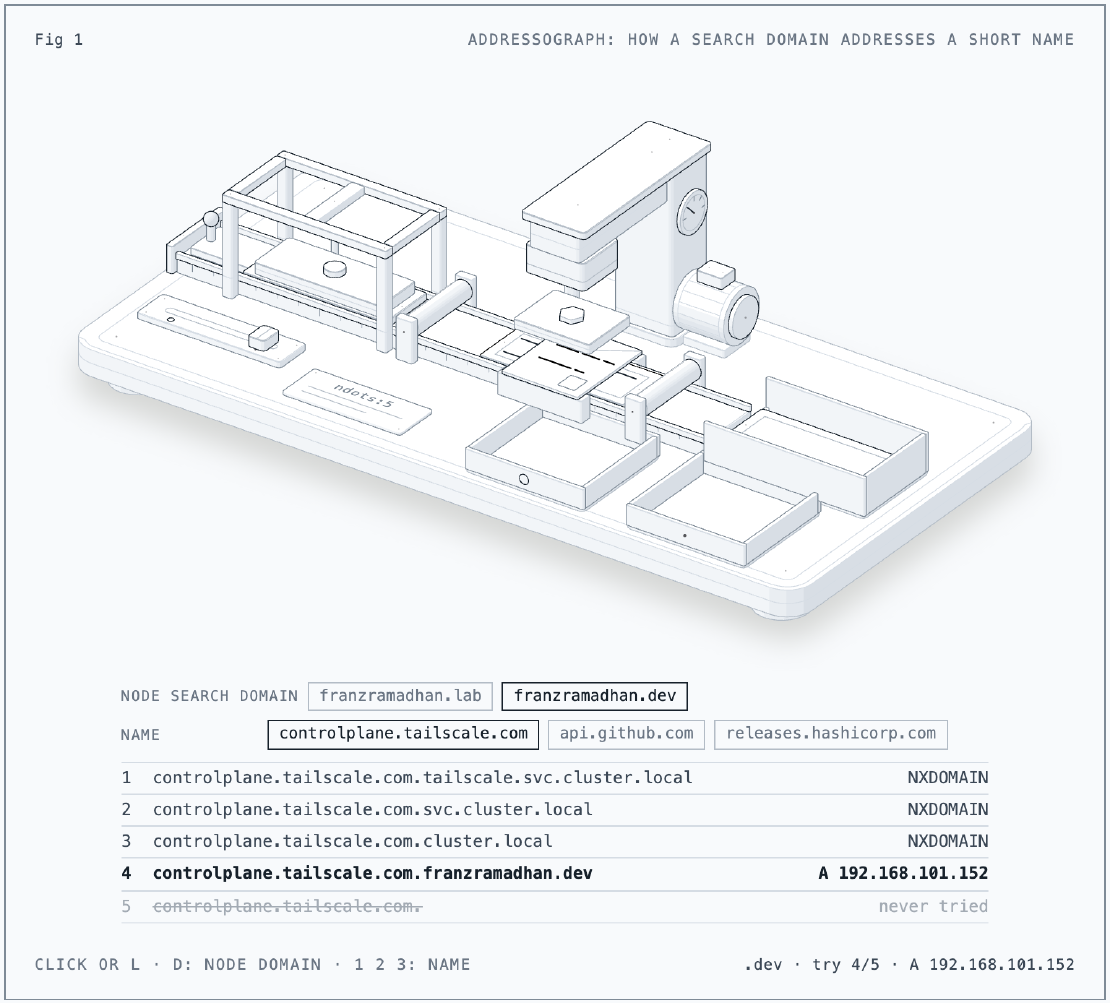
The Figure
- 1controlplane.
tailscale. com. tailscale. svc. cluster. local - 2controlplane.
tailscale. com. svc. cluster. local - 3controlplane.
tailscale. com. cluster. local - 4controlplane.
tailscale. com. franzramadhan. lab - 5controlplane.
tailscale. com.
The figure is an addressograph, the machine that stamped addresses onto letters
from a stack of metal plates. Each plate is one entry of the pod’s search list,
fed bottom first because controlplane.tailscale.com has fewer than five dots.
A plate with no answer (NXDOMAIN) is blank: the press strikes, nothing prints,
and the plate drops into the bin. The first plate with any answer inks the
letter. With the knob on franzramadhan.lab the node plate is blank, the bare
name prints the real address and the letter is delivered. Switch it to
franzramadhan.dev (click the machine, press L or D, or use the buttons) and
the wildcard embosses 192.168.101.152 on that plate: every name stops there
and goes to my own Gateway. Press 1, 2 or 3 to try api.github.com or
releases.hashicorp.com; they end up in the same tray. Built with the
anatomy
skill.
The Situation
- 3 Proxmox VE 9.2 hosts (pve-01, pve-02, pve-03), k0s on 8 Debian 13 VMs
built from a cloud-init template (Parts 2 and 7): 3 controllers and 5
workers. In k0s the controllers run the control plane (API server, etcd) but
are not Kubernetes nodes, so
kubectl get nodeslists only the 5 workers. - VMs stop at 23:30 and start at 06:00 by a systemd timer. They also have
onboot: 1, which makes Proxmox start them as soon as the host boots. - Each host runs Tailscale, which manages its
/etc/resolv.conf(nameserver 100.100.100.100,search <tailnet>.ts.net). - My kubeconfig talks to the API server through the Tailscale operator’s API proxy (Part 4). Grafana, Headlamp, LiteLLM, OpenBao and Wazuh are reachable through operator-managed proxy pods.
- My apps are served by a Cilium Gateway (Kubernetes Gateway API) on the
LAN IP
192.168.101.152.franzramadhan.devhas a public wildcard DNS record,*.franzramadhan.dev, that points to that IP.
The timeline, in WIB (UTC+7):
| Time | What happened |
|---|---|
| 16:34:40 | last journal line on pve-01, no shutdown logged: power gone |
| 19:48:28 | power back, the hosts boot |
| 19:48:34 | tailscaled starts on pve-01, not connected to its control server yet |
| 19:48:42 to 19:48:47 | Proxmox autostarts the k0s VMs (VM 101 on pve-01 at 19:48:44) |
| 19:49:37 to 19:49:40 | tailscaled writes its DNS config to the hosts’ /etc/resolv.conf |
| 20:18 | kubectl hangs, every in-cluster tailnet node shows offline |
| 20:43 | kubectl over the tailnet works again |
Issue 1: Healthy Cluster, No Way In
Symptom
kubectl get nodes hung. In tailscale status every in-cluster device
(tailscale-operator, grafana, headlamp, litellm, openbao) was offline,
“last seen 3h ago”. The hosts answered SSH, the Proxmox cluster had quorum (all
3 votes), and all 8 VMs were running.
Getting In Another Way
The API server address on the LAN answered:
ssh root@pve-01 'curl -sk -o /dev/null -w "%{http_code}\n" https://192.168.101.151:6443/readyz'
# 401
401 means the API server is up and refuses anonymous requests. A week earlier
my Mac could not reach the LAN from non-Apple binaries, so out of habit I
tunnelled through pve-01 and pointed a copy of the LAN kubeconfig at the
tunnel. Later that evening the LAN kubeconfig worked directly from the Mac, so
the tunnel was not needed:
ssh -f -N -L 16443:192.168.101.151:6443 root@pve-01
sed 's#https://192.168.101.151:6443#https://127.0.0.1:16443#' kubeconfig > kc-lan
KUBECONFIG=kc-lan kubectl get nodes
# 5/5 Ready
All 5 worker nodes Ready, no stuck pods, and the Cilium agent reported
72/72 healthy controllers and 5/5 nodes reachable. The cluster was fine. Only
the way in was not.
Cause, First Layer
Each in-cluster tailnet device is a proxy pod run by the Tailscale operator.
The ones on k0s-pve-01-worker-2 had restarted 8 to 11 times:
health(warnable=not-in-map-poll): error: Unable to connect to the Tailscale coordination server
failed to get a reissued authkey: failed to receive new auth key: timeout waiting for auth key reissue after 10m0s
Their logs show the loop: no connection to Tailscale’s coordination server,
then up to 10 minutes waiting for the operator to issue a new auth key, then a
restart. The operator, on the same node, was offline on the tailnet too and had
logged only tsnet starting since its last restart at 19:50. The one proxy on pve-02 was fine. So this was
about pods on pve-01, not about Tailscale itself.
Issue 2: The Node Had Internet, Its Pods Did Not
Symptom
From a proxy pod on pve-01’s worker, TLS to the coordination server failed. The same request from the node itself worked:
kubectl -n tailscale exec ts-headlamp-... -- wget -q -O /dev/null https://controlplane.tailscale.com/key
# ssl_client: SSL_connect
# wget: error getting response: Connection reset by peer

# on the node (VM 102)
curl -s -o /dev/null -w "%{http_code}\n" https://controlplane.tailscale.com/key
# 200
Dead End: Routing and NAT
I checked the obvious suspects for “node yes, pod no”:
- Tailscale routing table 52 (the routes Tailscale adds on each worker VM):
only tailnet peer routes on both the pve-01 and pve-02 workers, no exit node,
RouteAllfalse. Nothing that could catch internet traffic. - Cilium masquerade (rewriting a pod’s source IP to the node’s IP on the
way out): the
CILIUM_POST_natMASQUERADE rule was there, andcilium-dbg monitor --type dropshowed no dropped IPv4 packets, only IPv6 and LLC noise. - tcpdump on the worker’s eth0 during a test from a pod showed a complete
TLS session to
1.1.1.1, source NATed to the node’s IP.
That last test fooled me for a minute: the session was fine on the wire, yet
the pod reported a failure. https://1.1.1.1 redirects to a hostname, so my
“IP only” test still depended on DNS. Which was the real problem.
Cause
Resolving the name from Python in the LiteLLM pod, on the same node, gave it away:
socket.getaddrinfo("controlplane.tailscale.com", 443)[0][4]
# ('192.168.101.152', 443)
That is my own Gateway (lab-gateway, a Cilium Gateway). The headlamp proxy
pod’s /etc/resolv.conf:
search tailscale.svc.cluster.local svc.cluster.local cluster.local franzramadhan.dev
nameserver 10.96.0.10
options ndots:5
Kubernetes gives pods ndots:5 by default, and the last search entry comes
from the node. With ndots:5, any name with fewer than five dots is treated as
relative, so the resolver tries every search suffix before the bare name. The
first suffix that gets an answer wins; NXDOMAIN (“no such name”) means try the
next one. And franzramadhan.dev always answers:
dig +short '*.franzramadhan.dev' @1.1.1.1
# 192.168.101.152
dig +short controlplane.tailscale.com.franzramadhan.dev @1.1.1.1
# 192.168.101.152
So every external name, from controlplane.tailscale.com to api.github.com,
resolved to the Gateway. The Gateway has no listener for those names and
resets the handshake, which I checked from pve-01 with
curl --resolve controlplane.tailscale.com:443:192.168.101.152:
SSL_connect: Connection reset by peer.
On pve-02 the node’s search domain was franzramadhan.lab, which has no
wildcard, so those lookups got NXDOMAIN and fell through to the real answer.
flowchart LR
  P[Pod asks for<br/>controlplane.tailscale.com] --> S{ndots:5<br/>try search list}
  S -->|cluster.local suffixes| N1[NXDOMAIN]
  S -->|pve-01 node:<br/>.franzramadhan.dev| W[public wildcard<br/>192.168.101.152]
  S -->|pve-02 node:<br/>.franzramadhan.lab| N2[NXDOMAIN]
  W --> G[Cilium Gateway<br/>TLS reset]
  N2 --> B[bare name<br/>real IP]
Issue 3: Where the Search Domain Came From
Symptom
Only the three VMs on pve-01 (two workers and controller-01) had the wrong domain:
# VM 101 (pve-01)
grep Domains /run/systemd/network/10-netplan-eth0.network
# Domains=franzramadhan.dev

# VM 201 (pve-02)
grep Domains /run/systemd/network/10-netplan-eth0.network
# Domains=franzramadhan.lab
It came from /etc/netplan/50-cloud-init.yaml, which cloud-init had rewritten
at 19:48, during the boot after the power trip.
Cause
Proxmox hands each VM its cloud-init settings (IP, DNS, SSH keys) on a small
virtual CD, the cloud-init drive, which it builds when the VM starts. My VMs
had no searchdomain set. In that case Proxmox fills the search domain from
the host’s /etc/resolv.conf at that moment.
On a normal day that file belongs to Tailscale, and the VMs start at 06:00,
long after tailscaled has set it. After the power trip, tailscaled was already
running (19:48:34), but it writes /etc/resolv.conf only once it reaches its
coordination server and gets a DNS config: at 19:49:31 it was still trying,
and at 19:49:37 it logged wgengine: Reconfig: configuring DNS. On pve-01 the
VM started at 19:48:44, so for those 53 seconds the host still had its
original file, which Tailscale keeps as a backup:
grep search /etc/resolv.pre-tailscale-backup.conf
# pve-01: search franzramadhan.dev
# pve-02: search franzramadhan.lab
The .dev there is most likely left from the install: the host’s own name is
still pve-01.franzramadhan.dev, while pve-02 is pve-02.franzramadhan.lab.
Inside the VM, cloud-init compares an instance-id derived from that drive with the one from the last boot. Same id: it leaves the network config alone. New id: it treats the boot as a new instance and writes the network config again. The drive Proxmox built at 19:48:44 is still attached to the VM, so I could read exactly what it contained, and cloud-init’s log shows the id changing on that boot:
# inside VM 101
mount -o ro /dev/sr0 /mnt && ls -l /mnt && grep -A1 search /mnt/network-config
# meta-data, network-config, user-data, vendor-data: all 12:48:44 UTC (19:48:44 WIB)
#       search:
#       - 'franzramadhan.dev'

grep 'previous iid' /var/log/cloud-init.log | tail -2
# 2026-10-20 12:48:55 ... previous iid found to be a2fbd92b...
# 2026-10-20 12:48:58 ... previous iid found to be d80d388d...
The old id, a2fbd92b..., was the same at the two previous 06:00 starts, and
those boots logged No network config applied. Neither a new instance .... This
boot got a new id, so cloud-init rewrote the netplan file from the new data,
franzramadhan.dev included.
sequenceDiagram
  participant H as pve-01 host
  participant V as VM 101
  participant T as tailscaled
  T->>T: 19:48:34 started, no control server yet
  H->>V: 19:48:44 autostart, cloud-init drive built
  Note over H,V: host resolv.conf still says<br/>search franzramadhan.dev
  V->>V: cloud-init rewrites netplan<br/>Domains=franzramadhan.dev
  T->>H: 19:49:37 resolv.conf rewritten<br/>search <tailnet>.ts.net
  Note over H: too late for the VMs
One thing slowed me down here: qm cloudinit dump 101 network, which prints
the cloud-init network data Proxmox would generate, showed
search: <tailnet>.ts.net, not .dev. It is generated from the host’s
resolv.conf now, not from what the VM booted with, so it looked fine while
the VM was not.
Fix
First the running nodes. I avoided netplan apply, which can reconfigure
interfaces, because I did not want to risk a link change under Cilium on a
live node. On each of the three pve-01 VMs:
sed -i s/franzramadhan.dev/franzramadhan.lab/ /etc/netplan/50-cloud-init.yaml
netplan generate                      # rewrites the networkd file, touches no link
resolvectl domain eth0 franzramadhan.lab
Pods copy the search list when they are created, so fixing the node does not
fix running pods. I recreated the ones that need external names: the Tailscale
operator first, then its five proxies, then LiteLLM, Grafana, the
OpenTelemetry cluster collector, the GitHub Actions runner listener and one
OpenBao pod (OpenBao unseals itself on start, so that is safe). The proxies
were back on the tailnet within a minute, and kubectl through the usual
kubeconfig worked again. Pods that only talk to in-cluster names or IPs
(Postgres replica, VictoriaMetrics, VictoriaLogs, Pi-hole) I left alone: an
in-cluster name matches a cluster.local suffix before the bad one is ever
tried.
Then the actual fix: pin the domain so it never depends on the host’s resolv.conf. The setting lives in Terraform, but a Terraform apply would touch all three controllers in one run, and if the provider rebooted them together, etcd would lose quorum. So I set the value by hand first, which only edits the VM config and restarts nothing (it takes effect at the next VM start):
qm set 101 --searchdomain franzramadhan.lab # and the other seven
and then made Terraform match:
dns {
  domain  = "franzramadhan.lab"
  servers = ["192.168.101.200", "1.1.1.3"]
}
Because the value was already set on every VM, the plan said No changes.
and the apply Resources: 0 added, 0 changed, 0 destroyed. I also changed pve-01’s
pre-Tailscale backup file to franzramadhan.lab, so the host no longer carries
the old domain at all.
Results
| Before | After | |
|---|---|---|
| Search domain, pve-01 VMs | franzramadhan.dev | franzramadhan.lab |
| Search domain source | host resolv.conf at VM start | searchdomain in Terraform |
controlplane.tailscale.com from a pve-01 pod | 192.168.101.152 | 192.200.0.x |
| Tailscale proxies | restarting every 10 min | online |
| TLS to external hostnames from pve-01 pods | reset | 10/10 to codeload.github.com |
The first CI runs after the fix still hit the problem once: the Terraform
plan’s comment step failed with
read tcp 10.0.2.129:41266->192.168.101.152:443: read: connection reset by peer,
and the first apply failed with read ECONNRESET in the setup-terraform
step. The address in the first error is the same Gateway, but I did not find
out why a runner pod started after the fix still went there. Both reruns
passed, the apply with a few retried downloads.
Lessons
- Unset is not “none”. A VM without a search domain does not get an empty one; it gets whatever the host has when the VM starts. Pin anything that should not depend on boot order.
- Boot order is a dependency. The daily 06:00 start has hidden it every day so far. Only an autostart after a power loss raced tailscaled.
- A public wildcard to a private IP turns small mistakes into outages.
With
ndots:5, any search domain that always answers hijacks every external name. - Node fixed is not pod fixed. Pods copy
resolv.confat creation and keep it. - Make sure an “IP only” test really skips DNS.
https://1.1.1.1redirects to a hostname. - Keep a way in that skips the broken layer. The LAN kubeconfig, which does not go through Tailscale, showed a healthy cluster within minutes, which ruled out half the suspects. Test that path first instead of assuming an old limitation still holds.
Series
This post is part of Homelab Rebuild:
- Part 1: Upgrading Proxmox VE 8 to 9
- Part 2: Starting Over When the IaC Is Broken
- Part 3: When Tailscale Breaks Your Cilium Gateway
- Part 4: Living on the Tailnet
- Part 5: Secrets Without Secrets in Git
- Part 6: Certificates, DNS and a Private CA
- Part 7: Self-Hosted CI and Getting Back to IaC
- Part 8: Stateful Workloads on Unequal Hardware
- Part 9: Going Public Safely with Cloudflare Tunnel
- Part 10: When the Hypervisor Went Quiet
- Part 11: Hardening the Cluster in Five Layers
- Part 12: Observability with Coroot, and Losing pve-01
- Part 13: The Host That Kept Losing Power
- Part 14: Observability, Take Two with OpenTelemetry
- Part 15: Requests and Limits for Everything
- Part 16: Handing the Cluster to FluxCD
- Part 17: Making the Guardrails Earn Their Keep
- Part 18: When the API Server Outgrew Its VM
- Part 19: Logging In to OpenBao with Cloudflare Access and Google
- Part 20: Headlamp SSO, or Teaching kube-apiserver to Trust Cloudflare Access
- Part 21: pve-02 Loses Power, and Pi-hole Has Nowhere to Go
- Part 22: Turning Four Days of Fixes into AI Runbooks
- Part 23: microVM Sandboxes on Proxmox
- Part 24: Pi-hole Without a Home Host
- Part 25: It Was the Router
- Part 26: TLS on the Front, Plaintext Behind It
- Part 27: One Bad Power Adapter, Two Different Deaths
- Part 28: Observability, Take Three: Making It Worth Looking At
- Part 29: One Meter for Every Model, LiteLLM on Workers AI
- Part 30: Proxmox Joins the SSO, and a Plan Token Loses Admin
- Part 31: First Backups, Postgres, OpenBao and etcd to R2
- Part 32: Alerts That Reach Me, Even When the Lab Is Dead
- Part 33: The Firewall Held, the Tailnet Did Not
- Part 34: From Watching to Blocking, and a Record of Who Did What
- Part 35: Wazuh Without the 8 GB, Endpoint Security for One Mac and Three Hosts
- Part 36: The Fans Were Loud, the CPUs Were Idle
- Part 37: A Power Trip, a Search Domain and a Wildcard (this post)