Intro
To answer “is my homelab healthy?”, I needed four tabs: the Proxmox UI, Headlamp for Kubernetes and Flux, two Grafanas for alerts, and log queries for the security tools. During an outage it got worse, because the UIs that run in the cluster go down with it. And my lab powers off every night from 23:30 to 06:00. So “down” is a normal daily state, and every tool shows it in red.
So I wrote Homie, an open source dashboard that puts every layer of the lab on one page, with a few safe actions and deep links to the specialist UIs for everything else. Then I opened a read-only demo of it to the internet.
TL;DR: Homie is a single Rust binary with the web UI embedded and no database. It reads Proxmox, any Kubernetes cluster, Flux and Argo CD, Helm, any number of Grafanas, VictoriaLogs or Loki, Kyverno, Tetragon, Wazuh, Tailscale, healthchecks.io and GitHub Actions. All of them are optional. It went from the first RFC to v0.6.1 in about 29 hours, one RFC per feature, with 136 tests at 98% line coverage. In my cluster it uses 5 MiB of memory. The public demo at homie-demo.franzramadhan.dev is a separate pod. Its only login is a read-only role, enforced twice (the Homie filter and Kubernetes RBAC). It sits behind the Cloudflare Tunnel I already had and the one rate limiting rule of the free plan.
The Figure
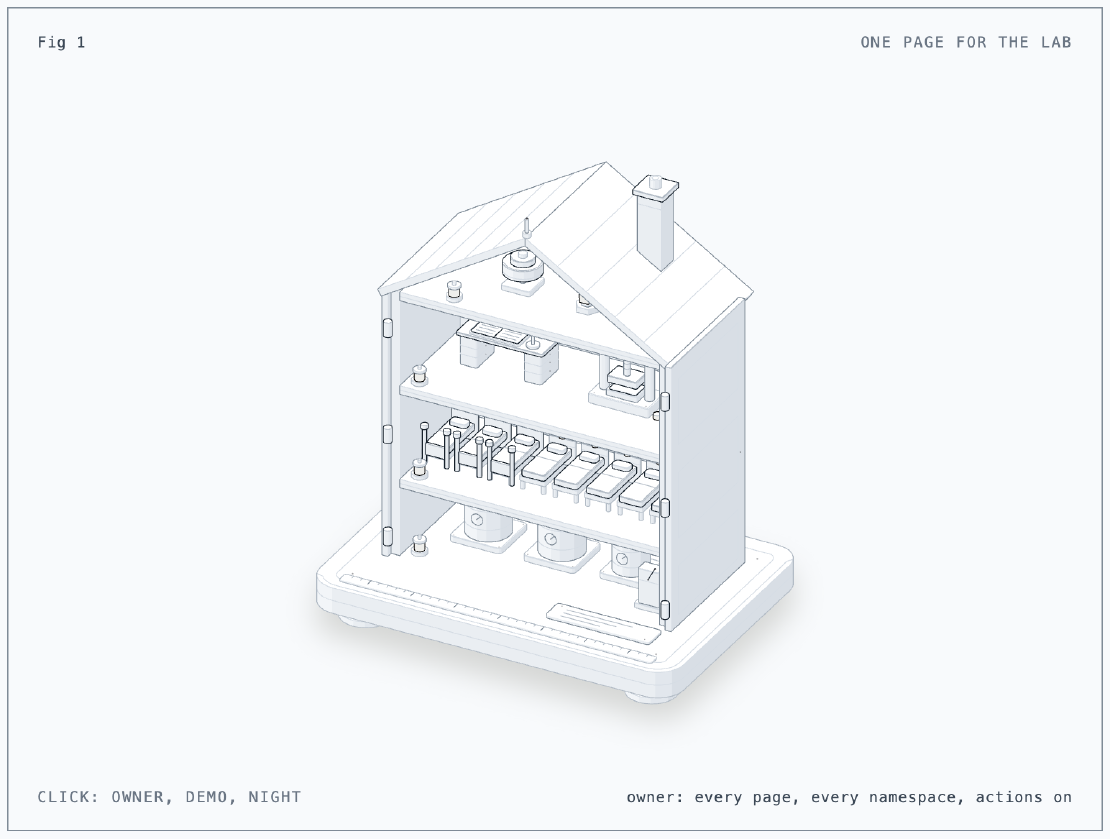
The dollhouse is the lab, and each floor is a layer Homie puts on one page. The cellar holds three boilers, the Proxmox nodes. The small one is pve-03, which only holds quorum. The ground floor holds eight bunks, the k0s VMs. The three four-poster beds are the controllers. The first floor is GitOps: a ledger desk and a screw press, Flux. The attic holds alerts, security and the tailnet: a bell, a lantern and a radio. Click the figure or press Space to switch viewers. The owner sees every floor, with the power switch free. The demo role gets a padlock on the switch and a louvred shutter over the attic. In quiet hours, the front closes and the lamps turn grey, not red. I built the figure with the anatomy skill.
The Situation
- Homie v0.6.1, MIT, on GitHub and at homie.franzramadhan.dev: Rust backend, a Vite, React and TanStack SPA embedded in the binary. The binary is 7.5 MB, and the amd64 image is about 4.5 MB compressed.
- Lab: three Proxmox VE 9.2 hosts, a k0s cluster on 8 VMs (3 controllers, 5 workers), Flux (Part 16), secrets from OpenBao (Part 5).
- Login: Cloudflare Access with Google as the OIDC provider, the same one Headlamp uses (Part 20).
- Alerts: the in-cluster Grafana and Grafana Cloud (Part 32).
- Public path: the Cloudflare Tunnel to
public-gateway(Part 9), unused until now.
RFC First, Even for a One-Day Project
The first commit was
RFC 0001:
the problem, goals, non-goals, every configuration key, security
considerations, alternatives and the exit criteria for v0.1.0. After that,
every feature started as its own RFC. I merged each one as accepted before
any code. Every deviation I found during the build went back into it.
| Milestone | Time (WIB) |
|---|---|
| First commit (RFC 0001) | 10:38 |
| v0.1.0 (Proxmox, Kubernetes, Flux, Grafana, password and OIDC login) | 14:02 |
| v0.2.0 (design system, Argo CD, log search, sparklines, service cards, Helm chart, GitHub Actions) | 16:16 |
| v0.3.0 (live updates over server-sent events) | 17:50 |
| v0.5.0 (save the watched workflows without a restart) | 19:36 |
| RFC 0016 (roles and a public demo) accepted, then built | 20:17 to 21:18 |
| Tests from 39% to 98% line coverage | 22:15 |
| Roles never see IP addresses | 22:34 |
| Homepage on GitHub Pages (next day) | 10:24 |
| v0.6.0 (RFC 0016 released) | 14:14 |
| v0.6.1 (fixes from a security review) | 15:39 |
16 RFCs so far: 12 implemented, 4 rejected and kept for the record (Flux suspend, configurable security presets, Alertmanager, guest migration). A rejected RFC is cheap and still useful. The next time I want guest migration, I can read why I said no.
I tested every release in the lab first. A manual workflow builds
homie:dev-<sha>, and I pin its digest in the infrastructure repo. Flux rolls
it out. Then a local end-to-end script logs in with a password and checks every
page and the refusals. With --actions, it also power-cycles a sandbox VM
through Homie.
How It Works
flowchart LR
  B[Browser: Homie SPA] -- "same origin, cookie" --> H[homie binary]
  H --> C[TTL cache and last-known state]
  H -- "API token" --> P[Proxmox VE]
  H -- "user's ID token" --> K[kube-apiserver]
  H -- "Viewer token" --> G[Grafana, Grafana Cloud]
  H -- "API keys" --> O[Tailscale, healthchecks.io, GitHub]
- A backend is not optional. Neither the Proxmox API nor kube-apiserver sends CORS headers, and credentials must never reach the browser. The browser only talks to Homie.
- Named queries, not a proxy. The API has a fixed list of queries
(
pve.resources,k8s.flux,security.wazuh, …) and actions (guest power, Flux reconcile). Each returns{ data, fetched_at, stale, quiet, error }. That is an allowlist by construction. Backend URLs and query languages stay out of the browser. - Cached and stale-tolerant. Homie caches results for 10 to 30 seconds, so
several tabs do not multiply the load. A failed fetch returns the last good
result marked
stale. On a laptop,state_diralso keeps a snapshot on disk. Homie still shows the last known state when the whole lab is off. - Quiet hours. Inside
23:30-06:00(Asia/Jakarta), anything markedquietthat is unreachable shows as grey “scheduled off”, not red. Homie lists its alerts but does not count them. Grafana Cloud and healthchecks.io are not quiet, because they must never go dark. Red every night teaches you to ignore red. - No standing cluster-admin. With
forward_token, Homie calls kube-apiserver with the logged-in user’s own ID token. So the audit log saysoidc:<email>, not a ServiceAccount. kube-apiserver needed a secondjwtissuer in its structured authentication configuration. It reloads that file on change, so I copied it to the controllers one at a time with no restart. - Proxmox power, but not configuration. A
homie@pveuser has the PVEAuditor privileges plusVM.PowerMgmt. It can start, shut down and stop guests. It cannot change or delete them. Guests taggedhomie-protected(my three controllers, because two down loses etcd quorum) need their name typed before any power action.
Issue 1: Every Power Action Failed
Symptom
The first power test against the real cluster failed for every guest. The failed-task list was empty, but I knew there were failed tasks.
Cause
The helper that joins a base URL and a path percent-encoded the ? in
/cluster/resources?type=vm. Proxmox answered 501, and the action could not
find the guest. The task query failed the same way, with no error shown.
Fix
I split the query string off before the join and added a regression test. Failed tasks now come from the last 24 hours only, so a week-old failure does not keep the overview amber.
Issue 2: Shut Down Did Not Shut Down
Symptom
I clicked Shut down on a VM. Nothing happened, and a second click failed with
can't lock file .../lock-<vmid>.conf.
Cause
The Proxmox shutdown asks the guest (through the guest agent) to power off, and that guest did not. The first task was still running and held the lock, so the second one could not start. Homie had no hard stop and showed failures as plain text.
Fix
I added a stop action (hard power-off). It always needs the guest name
typed. The server refuses any action while the guest has an active task. Task
results are green or red, and a failed shutdown suggests Stop.
The Public Demo
I wanted a link in the README that shows Homie on a real lab, without showing the real lab. RFC 0016 added roles:
- A role lists its pages (the demo gets Infrastructure, Workloads and
GitOps), an explicit namespace allowlist (exact names, no globs, so a new
namespace never shows up by accident), and Proxmox tags (only guests
tagged
demo, and nodes show without addresses). - A role never runs actions. Every route except read queries, the live
stream and logout answers 403, logged as
msg="denied". - Try the demo on the login page starts a session with the role, with no password. A session lasts at most an hour, with at most 200 at once. Sessions get no live watches, so visitors never add load on kube-apiserver.
The filter in Homie is one boundary. Kubernetes is the second. The role reads
the cluster through a ServiceAccount that only has view in the three
allowed namespaces.
flowchart LR
  V[Visitor] --> CF["Cloudflare edge<br/>TLS, rate limit"] --> T[Tunnel] --> PG[public-gateway] --> D["homie-demo pod<br/>role demo"]
  D -- "impersonate" --> R["SA reader<br/>view in homie, databases, litellm"] --> K[kube-apiserver]
  D -- "PVEAuditor token" --> P[Proxmox]
I also ran it as a separate instance, not a role inside my own Homie. The
demo pod holds only a read-only Proxmox token and a ServiceAccount that can
impersonate exactly one other ServiceAccount, reader. No long-lived token
exists for it. If the demo is ever compromised, that is all it reaches.
Issue 3: The Demo Showed Error Cards
Symptom
The first demo deploy showed an error instead of the Flux list, and an Argo CD error card on a cluster that has no Argo CD.
Cause
Both came from the narrow RBAC of the role. Homie listed GitRepositories for
the Flux page. reader cannot list them, and one failed list failed the whole
page. For Argo CD, kube-apiserver checks authorization before it checks
whether the resource exists. So reader got a 403 instead of the “not
installed” answer that Homie expected.
Fix
A role lists only the kinds it can be shown (Kustomizations and HelmReleases,
because sources were already hidden). It never queries Argo CD or Helm. That is
also why reader needs no extra rules for them.
Issue 4: Flux Applied Only the Namespace
Symptom
The Flux Kustomization of the demo applied the namespace and then stopped.
Cause
My Kyverno policy restrict-externalsecret-paths
(Part 11) lets a namespace read
only OpenBao paths that start with its own name. The ExternalSecret of the
demo read homie/demo and homie/app, under the path of the main instance.
Fix
I gave it its own path, secret/homie-demo/app, with only the read-only
Proxmox token and the password hash for the e2e login. The policy did its job.
The demo must never read the secrets of the main instance.
Going Public
The tunnel already forwards *.franzramadhan.dev to public-gateway, and
public-gateway only takes routes from namespaces labelled exposure=public.
To publish, I made four small changes:
- the namespace label
exposure=public, - an
HTTPRouteforhomie-demo.franzramadhan.devonpublic-gatewaywithexternal-dns.kubernetes.io/cloudflare-proxied: "true", so external-dns creates the proxied CNAME to the tunnel, - the Cilium network policy also allows the
ingressentity, because traffic from the Gateway comes from the Cilium Envoy, not from a pod, public_urlset to the public host. Homie checks theOriginheader of a login againstpublic_url. After this change, the tailnet copy still serves the page but refuses logins with 403.
The demo lists only guests tagged demo, so the 8 k0s VMs got the tag.
GitHub Actions had trouble that evening. So I applied the tag on each host
with qm and put the same change in Terraform, and the next plan shows no
drift. qm set --tags replaces the whole list, so I give it the full list
plus the new tag:
t=$(qm config "$id" | sed -n 's/^tags: //p')
qm set "$id" --tags "$t;demo"
Issue 5: The Cloudflare Token Looked Invalid
Rate limits belong in front of Homie, not in it. The free plan includes one rate limiting rule. I wanted it in place before the route went live:
(http.host eq "homie-demo.franzramadhan.dev"
 and (starts_with(http.request.uri.path, "/api/")
   or starts_with(http.request.uri.path, "/auth/")))
60 requests per 10 seconds per colo and IP, block for 10 seconds
Symptom
With a new API token, GET /user/tokens/verify answered Invalid API Token
(code 1000), and GET /zones?name=franzramadhan.dev answered success: true
with 0 results.
Cause
Two separate things. The token was account-owned. Cloudflare verifies
those at /accounts/<id>/tokens/verify, which said active. And the token did
not have Zone Read on the zone yet. The zones list reports that as an empty
result, not as an error.
Fix
I added Zone Read and Zone WAF Edit on the zone. The zone had no rate limit
ruleset yet. So one PUT to /zones/<id>/rulesets/phases/http_ratelimit/entrypoint
created it with the rule. A burst of 200 requests from my laptop, 25 at a
time, got one 429 from Cloudflare. My burst only reached about 2.5
requests per second, so it rarely crossed the limit. But the rule is there.
Verifying It
From outside: / returns 200 and /api/meta returns 401 without a session.
The demo part of the e2e script, pointed at the public URL:
PASS demo options ({"demo":true,"local":true,"oidc":false})
PASS demo login (204)
PASS demo namespaces (homie,litellm)
PASS demo refuses /api/q/alerts/lab (403)
PASS demo refuses /api/q/tailscale/_ (403)
PASS demo refuses /api/github/repos (403)
PASS demo refuses power (403)
The guest list shows exactly the 8 k0s VMs. databases shows no workloads,
because the CloudNativePG pods have no Deployment or StatefulSet. That is a
gap in the Homie workload list, not in the role. The demo pod uses 2 MiB.
A day later, the public host sits behind a Cloudflare managed challenge.
Scripts get a 403 “Just a moment…” page, while browsers pass it without a
click. The e2e script now reaches the demo through kubectl port-forward,
which tests Homie and not Cloudflare.
From 23:30 to 06:00 WIB the lab is off, so a visitor gets the Cloudflare tunnel error page. A friendlier page is a job for a Cloudflare custom error page, not for Homie.
Issue 6: The Demo Leaked Addresses
Symptom
To put screenshots in the README, I logged in to the public demo as a
visitor. The Infrastructure page listed the Proxmox tags of each guest, and
they included the LAN addresses of the VMs (192.168.x.y). The Workloads page showed a
readiness-probe warning that named a pod address. Every test had passed.
Cause
I tag guests with their address, and Homie passed tags and event messages through unchanged. The role filter removed rows that the role must not see. But nothing looked inside the rows it kept.
Fix
For a role, every string in a result now goes through a redaction. It replaces
IP addresses (with or without a port, IPv4 and IPv6) with <ip>. Homie drops
tags that are addresses. Hashes, versions and times stay as they are, with
tests for both cases.
Then I asked for a security review of the roles code, as if someone else wrote it. It found no exploitable hole. But it found three ways the boundary failed open (gave access when something went wrong). I fixed all three in v0.6.1:
- Errors skipped the redaction. Proxmox and kube-apiserver are unreachable every night. Then the error names the endpoint it tried, by address. Errors now go through the same redaction.
- Some address forms slipped through:
[10.0.0.1]without a port, and an address glued to other text. - Roles for OIDC users matched emails case-sensitively. An email written
Me@Example.comin the configuration never matched the lowercased one from the provider. So that user got full access instead of the role, with no warning.
Tests Against Fake Backends
Unit tests covered 39% of the lines, mostly configuration parsing. The rest
of the code talks to Proxmox, Kubernetes, Grafana, GitHub and an OIDC provider.
So the tests now run against a fake of each. The fakes are small HTTP servers
on a random loopback port that answer with recorded JSON. There is also a fake
kube-apiserver behind a real kube client, and a fake OIDC provider that signs
ID tokens with a test RSA key. The server tests run the real router against
those fakes: logins, CSRF and Host checks, roles, every query and action, the
live stream.
136 tests run in about 4 seconds, at 98% line coverage. The uncovered part is
uncovered on purpose. The GitHub OAuth exchange and the Tailscale API use fixed
public URLs, and tests never touch the network. A workflow on main writes
the test count and coverage as badge JSON to an orphan branch. The README
badges need no third-party service.
A Homepage and a GIF
The README now opens with a GIF of a full instance: overview, Proxmox,
Kubernetes, Flux, alerts and log search. The first recording showed my email
in the header, the tailnet name in the status bar of the browser, LAN
addresses in the tags, and every device on the Tailscale page. ffmpeg blurs
the first three. It also cuts the Tailscale, Security and Workflows pages
before anything reaches a public repository.
homie.franzramadhan.dev is a single static
page in the site/ folder of the repository, published by GitHub Pages, with
a CNAME in Cloudflare set to DNS only. For a few minutes, the browser refused
it. Every .dev domain is on the HSTS preload list, so browsers only use
HTTPS. GitHub serves its *.github.io certificate until it issues one for the
custom domain. That took 15 minutes. Then I turned on Enforce HTTPS.
Lessons
- Write the RFC even when you are the only reader. It took minutes, and it decided what not to build. The rejected ones stopped me from re-arguing them an hour later.
- Test against the real thing early. The URL encoding bug and the stuck shutdown passed every unit test and failed on the first real VM.
- Narrow RBAC changes what errors look like. A 403 can mean “you are not allowed to know whether this exists”. So a role must not ask questions that it cannot get an answer to.
- Two boundaries for anything public. The role filter in Homie and the ServiceAccount in Kubernetes each stop a bug in the other. The separate pod limits what a compromise reaches.
- An empty answer is not always a no. Zero zones meant a missing permission. An invalid token meant the wrong verify endpoint.
- Look at the demo the way a stranger does. The address leaks passed every test and showed up in the first screenshot.
- Review a boundary for where it fails open. Each gap that the review found gave more access or more data than intended when something unexpected happened. The triggers were an error, an odd format and a different letter case.
References
- Homie homepage
- GitHub: franzramadhan/homie
- GitHub: homie RFC 0001, foundation
- GitHub: homie RFC 0016, roles and a public demo
- GitHub: wheresryan22/anatomy
- Kubernetes: User impersonation
- Kubernetes: Structured authentication configuration
- Proxmox VE: User management and privileges
- Cloudflare: Rate limiting rules
- Cloudflare: Account-owned API tokens
- GitHub Pages: Managing a custom domain
- HSTS preload list
- Cilium: Entities based policy