Intro
I wanted to point an autonomous AI pentester at my own public demo,
homie-demo.franzramadhan.dev, and let it probe the app the way an external
attacker would. The tool is PenTAGI (vxcontrol/pentagi): you give it a target
and a goal, and a crew of LLM agents plans the attack, runs tools and reads the
output. The catch is that an autonomous attacker is exactly the kind of process
you do not want anywhere near your own infrastructure. So the real question was
not “can it find anything”, it was “can I run it without giving it any path into
my homelab cluster”.
TL;DR: run it inside a throwaway VM that is network-isolated at the VM boundary. It stays fully contained even when it spawns its own attacker containers, because the containment lives below anything the agent can touch. But on Cloudflare Workers AI the agent is too weak at tool-calling to actually drive a pentest: 47+ LLM calls, and zero tasks, tool runs or spawned containers.
The Figure
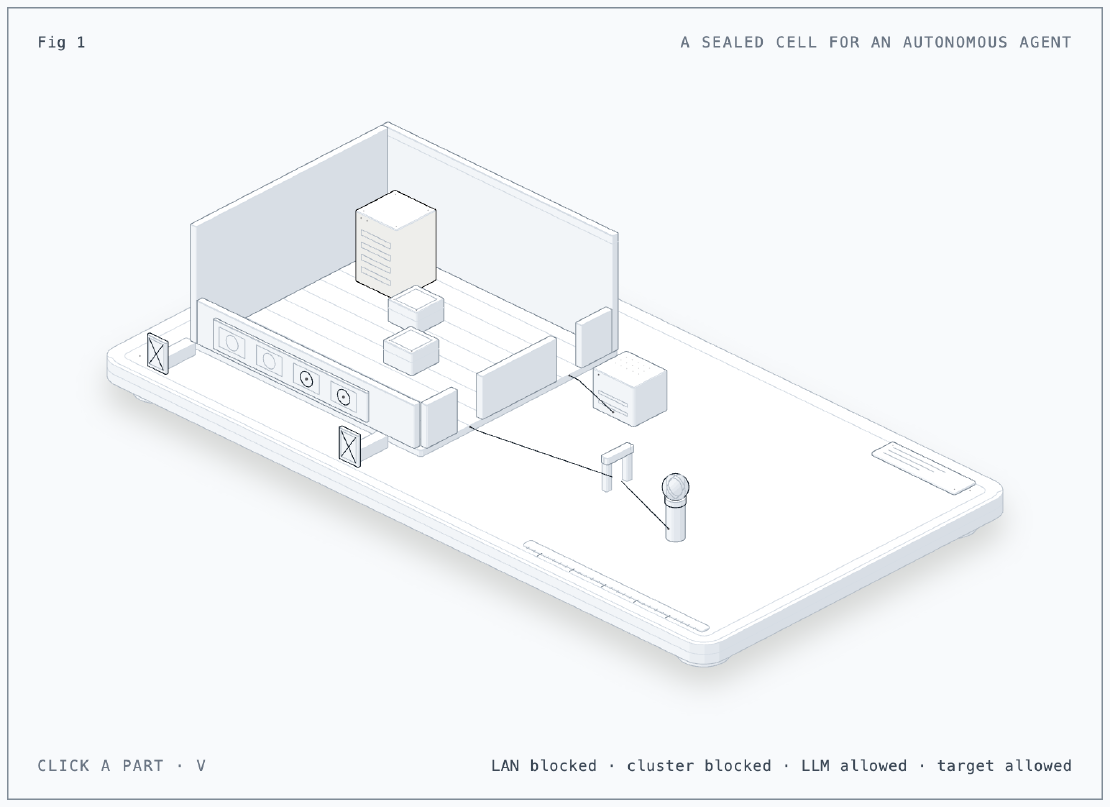
The figure is a sealed cell on a bench. Inside sits the agent (the tall lit
server) with the attacker containers it would spawn beside it. Two routes out of
the cell are capped bulkheads with a crossed-out plate: the LAN (and its
gateway) and the k0s cluster. Two thin lines leave the other side: one to the
LiteLLM proxy box, one through a cloud edge to a globe, the public target. Four
lamps on the front wall read LAN blocked, cluster blocked, LLM allowed,
target allowed. Click the agent, a bulkhead or the target to list the probes
that pass, and press V to switch between running the probe from the VM and
from a container the agent spawned: both see the LAN and the cluster blocked and
the target reachable, which is the whole point. Built with the
anatomy skill.
The Situation
The obvious place for a new workload in my homelab is the k0s cluster. PenTAGI is the wrong workload for it, for a few reasons that all come down to how it runs.
- PenTAGI is Docker-socket-native. It mounts the Docker socket, runs as root, and spawns a fresh container for each pentest “flow” so the agent has a clean box to work from. That design assumes a Docker daemon it can drive.
- My cluster has no Docker socket, by design. It is k0s on top of
containerd, so there is no
/var/run/docker.sockto mount. On top of that the cluster is locked down: Kyverno denies privileged pods and Tetragon kills a process on a policy hit. A privileged docker-in-docker pod would fight every one of those guardrails at once, and I built those guardrails on purpose (Part 17 and Part 34). - A microVM is too small. My microVM sandboxes (Part 23) are deliberately tiny. PenTAGI needs a full Docker daemon that itself spawns Kali containers, plus a pgvector database for the agents’ memory and a scraper that asks for a 2 GB shared-memory segment. That does not fit.
So the answer was a dedicated full VM: one Debian 13 guest, off by default, started by hand only for a run. The isolation does not live inside the tool or inside Docker. It lives at the VM’s network boundary, which is below anything the agent (or a container the agent spawns) can reach. This is the same lesson as my guest-VM isolation post (Part 33): put the wall where the tenant cannot get under it.
Setup
The VM
The VM is defined in Terraform, cloned from my Debian 13 template, with 4 vCPU, 8 GiB of RAM and a 40 GB disk. The important part is what it is not: it is kept out of the Terraform group that defines my k0s nodes, so it does not inherit their autostart. It carries a no-autostart tag, it does not start on host boot, and the nightly power schedule that stops and starts the cluster leaves it alone. It exists stopped, and I start it by hand when I want a run.
Isolation layer 1: the LAN
The first wall is the Proxmox firewall. The VM’s NIC has the firewall enabled and points at a firewall group that:
- drops traffic to the home subnets, including the gateway,
- allows the router only on port 53 so DNS still works,
- leaves general outbound internet open.
The result is a VM that can reach the internet and resolve names, but cannot touch anything else on the LAN. This is the same firewall group my isolated guest VM uses, so it is a pattern I already trust.
Isolation layer 2: the tailnet
The VM also joins my tailnet, so I can reach its web UI without exposing it. The risk with the tailnet is the opposite of the LAN: by default a device on it can be quite reachable. So the VM gets a dedicated tag with exactly one scoped grant, which lets it reach only the LiteLLM node on port 443 and nothing else:
// one grant, nothing else matches this tag
src:  tag:pentagi
dst:  the LiteLLM node
ip:   tcp:443
The reason this is airtight is that the LiteLLM node is itself a tagged device,
not one owned by my user, so the broad “allow my own devices to reach
everything” grant does not match it. The VM joins the tailnet already tagged
(tailscale up --advertise-tags=tag:pentagi). My tailnet has device approval
turned on, so the machine sat in a “needs approval” state until I approved it in
the admin console, and only then did tailscale up return success.
LLM via LiteLLM
The agents talk to my in-cluster LiteLLM proxy (Part 29), which is Cloudflare
Workers AI only. That makes this experiment-grade from the start: Workers AI is
cheap and private, but it is not a frontier model. PenTAGI also wants embeddings
for its pgvector memory, so I added a bge embedding model to the proxy and
confirmed it returns the right number of dimensions.
PenTAGI’s custom OpenAI-compatible provider points at the proxy, and all 13
agent roles map to the proxy’s smart complexity router. One line is worth
calling out, because it cost me an afternoon:
# PenTAGI .env: for a LiteLLM proxy whose model names are bare, leave this EMPTY
LLM_SERVER_URL=https://litellm.<tailnet>/v1
LLM_SERVER_MODEL=smart
LLM_SERVER_PROVIDER=
LLM_SERVER_PROVIDER is a prefix PenTAGI prepends to the model name for
provider routing. My model names are bare (smart, not openai/smart), so if
the variable is set, PenTAGI sends prefix/smart and the proxy answers HTTP
400. Leaving it empty fixes it.
The stack
A single docker compose up -d brings up PenTAGI plus its pgvector database, a
scraper, and a Postgres exporter. The migrations run, and the API comes up on
TLS. The UI is reachable over TLS on the LAN, and the default login is
admin@pentagi.com / admin. Change that on first login without fail: it is a
console that drives an autonomous attacker, so it is the last thing you want
sitting on a default password.
What Happened When I Ran It
Containment first
Before pointing it at anything, I checked the walls. From the VM itself, the allowed paths work and nothing else does. Then the check that actually matters: I had PenTAGI spawn a container (the same mechanism it uses for a real flow) and ran the same probes from inside that container. The container could reach the public target, but got nothing to the LAN gateway or the k0s controllers: the connection was simply blocked.
| Destination | From the VM | From a spawned container |
|---|---|---|
| the LiteLLM proxy on 443 | open | not on this path |
| DNS via the router | open | not tested |
| general internet | open | open |
homie-demo (the target) | HTTP 200 | HTTP 200, via a Cloudflare edge IP |
| the LAN gateway | blocked | blocked |
| a k0s controller or worker | blocked | blocked |
| any other tailnet host | blocked | not reachable |
That last column is the whole argument. The containers PenTAGI spawns are not covered by some rule inside PenTAGI or inside Docker; they are covered because they sit inside the VM, and the wall is at the VM boundary. It holds no matter what the agent decides to do, because the agent never gets to decide anything below that line. The request to the target went out over the internet and came back through a Cloudflare edge IP, which also confirms the “attack” really leaves the house and comes back the front door, rather than finding some internal shortcut.
The agent itself
With containment proven, I started two flows with a tightly scoped prompt,
restricted to only homie-demo. Then I watched it do almost nothing.
The agent made 47+ LLM calls (about $0.15 on Workers AI) and produced zero tasks, zero tool executions, and spawned zero sandbox containers. It stalled in planning. PenTAGI’s planner needs the model to return structured tool-calls it can execute, and Workers AI does not do that reliably enough to get past the first step. The crew talked to itself and never picked up a tool.
One thing nearly fooled me while I watched the traffic. During the run the only
non-LLM outbound connections from the VM were Tailscale’s own DERP relay
connections, owned by the tailscaled process. It is easy to glance at that and
think the agent is reaching out to something. It was not: it was my own tailnet
keeping its relays warm. Knowing what your own infrastructure does in the
background is the difference between a false alarm and a finding.
Lessons
- Put containment at the VM boundary, and prove it from inside a spawned container. A wall the tenant cannot get under beats any number of rules the tenant’s own runtime is supposed to enforce. Test it from where the agent actually runs, not just from the host.
- A locked-down Kubernetes cluster is the wrong home for a Docker-socket-native tool. Kyverno and Tetragon exist to stop exactly the kind of privileged, root, socket-mounting workload PenTAGI is. A throwaway VM is the right home, because there is nothing there to protect.
- Cloudflare Workers AI is too weak at tool-calling to drive an agentic pentester. The containment works, but the pentest does not: you need a capable function-calling model behind the proxy before the agent will pick up a single tool.
- Verify scope by watching egress, and know your own background noise. The only traffic leaving the VM during the run was Tailscale DERP relays. If you do not recognise your own infrastructure’s chatter, you will mistake it for the tool.
Series
This post is part of Homelab Rebuild:
- Part 1: Upgrading Proxmox VE 8 to 9
- Part 2: Starting Over When the IaC Is Broken
- Part 3: When Tailscale Breaks Your Cilium Gateway
- Part 4: Living on the Tailnet
- Part 5: Secrets Without Secrets in Git
- Part 6: Certificates, DNS and a Private CA
- Part 7: Self-Hosted CI and Getting Back to IaC
- Part 8: Stateful Workloads on Unequal Hardware
- Part 9: Going Public Safely with Cloudflare Tunnel
- Part 10: When the Hypervisor Went Quiet
- Part 11: Hardening the Cluster in Five Layers
- Part 12: Observability with Coroot, and Losing pve-01
- Part 13: The Host That Kept Losing Power
- Part 14: Observability, Take Two with OpenTelemetry
- Part 15: Requests and Limits for Everything
- Part 16: Handing the Cluster to FluxCD
- Part 17: Making the Guardrails Earn Their Keep
- Part 18: When the API Server Outgrew Its VM
- Part 19: Logging In to OpenBao with Cloudflare Access and Google
- Part 20: Headlamp SSO, or Teaching kube-apiserver to Trust Cloudflare Access
- Part 21: pve-02 Loses Power, and Pi-hole Has Nowhere to Go
- Part 22: Turning Four Days of Fixes into AI Runbooks
- Part 23: microVM Sandboxes on Proxmox
- Part 24: Pi-hole Without a Home Host
- Part 25: It Was the Router
- Part 26: TLS on the Front, Plaintext Behind It
- Part 27: One Bad Power Adapter, Two Different Deaths
- Part 28: Observability, Take Three: Making It Worth Looking At
- Part 29: One Meter for Every Model, LiteLLM on Workers AI
- Part 30: Proxmox Joins the SSO, and a Plan Token Loses Admin
- Part 31: First Backups, Postgres, OpenBao and etcd to R2
- Part 32: Alerts That Reach Me, Even When the Lab Is Dead
- Part 33: The Firewall Held, the Tailnet Did Not
- Part 34: From Watching to Blocking, and a Record of Who Did What
- Part 35: Wazuh Without the 8 GB, Endpoint Security for One Mac and Three Hosts
- Part 36: The Fans Were Loud, the CPUs Were Idle
- Part 37: A Power Trip, a Search Domain and a Wildcard
- Part 38: An Autonomous AI Pentester in a Sealed Box (this post)