Intro
Two apps in the lab are public: homie-demo and ipcalc. Their APIs sat behind one Cloudflare WAF rate limit rule, the only one the free plan gives me. Earlier today I wrote about dvarapala, the anti-DDoS gateway I built, and the obvious next step was to put it in front of my own apps instead of the Cloudflare rule.
The rule is gone now. This post covers how dvarapala sits in the request path, what changed for someone hitting the API too fast, and how the two homie-demo replicas share their counts through Postgres.
TL;DR: one dvarapala Deployment per app, with the HTTPRoute sending only
/api/(and/auth/on homie-demo) through it. A token bucket of 60 with 6 back per second keeps the old steady rate of 60 per 10 s, but a visitor coming in from idle now gets up to about 120 in the first 10 s, and a throttled request waits 1 s instead of 10. homie-demo runs two replicas that add their counts to a 10 s window in advarapaladatabase on the CloudNativePG cluster, so a visitor cannot double their allowance by landing on both.
The Figure
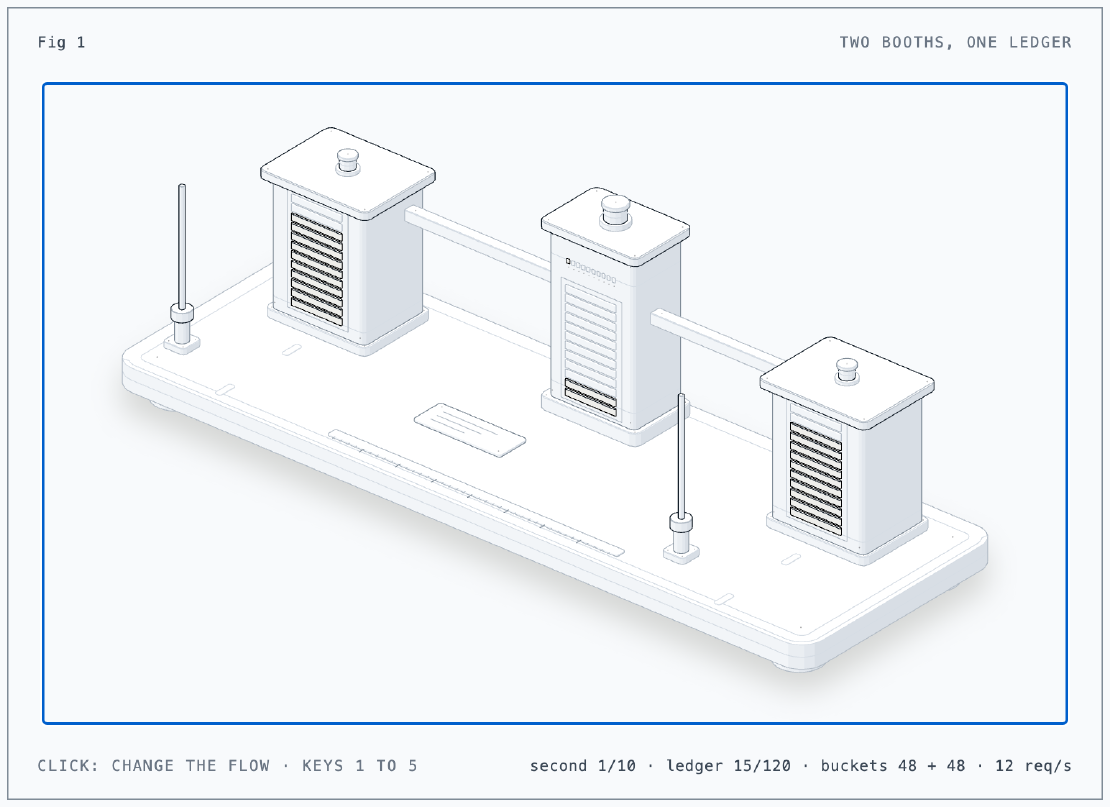
The figure is two tollbooths with a hopper between them. Each booth is a dvarapala replica, and the gauge on its front is its own token bucket for one visitor: 12 bars of 5 tokens, refilling at 6 a second. The hopper is the shared count in Postgres: every second (the lamp on top blinks) both booths add what they let through, and its gauge fills toward 120 for the current 10 second window, with the pips above it counting the seconds. A barrier lifts for each request let through. When a booth’s bucket is empty, or the hopper passes 120, the barrier stays down and the lamp on the booth’s roof lights: that is a 429. Click the figure, or press 1 to 5, to change the flow from 0 to 30 requests per second. Built with the anatomy skill.
The Situation
- Both apps are reached through a Cloudflare Tunnel, then the Cilium
public-gatewayin the k0s cluster (Part 9). - The old Cloudflare rule: 60 requests per 10 s per IP and Cloudflare data
center, then a 10 s block, on homie-demo
/api/and/auth/and ipcalc/api/. On the free plan that is the whole feature: one rule, a 10 s period, a 10 s block. Every public app had to be added to that one expression. - dvarapala 0.6.2, from
ghcr.io/franzramadhan/dvarapala. Version 0.6.1 was the first with a container image, and 0.6.2 is the first image with the Postgres store compiled in (more on that below). - CloudNativePG cluster
pg, two instances on NVMe data disks (Part 8), passwords from OpenBao through External Secrets (Part 5).
Setup
dvarapala does one upstream, the gateway does the routing
dvarapala proxies to exactly one upstream and has no host or path matching:
everything it receives is rate limited. That decided the layout. Each app gets
its own dvarapala Deployment and Service, and the HTTPRoute picks which paths
go through it. Static pages and assets skip it.
flowchart LR
  V[Visitor] --> CF[Cloudflare edge] --> T[Tunnel] --> GW[Cilium public-gateway]
  GW -->|/api/, /auth/| D[dvarapala<br/>2 replicas]
  GW -->|everything else| H[homie-demo]
  D --> H
  D -. counts every 1 s .-> PG[(CNPG pg<br/>db dvarapala)]
rules:
  - matches:
      - path: {type: PathPrefix, value: /api/}
      - path: {type: PathPrefix, value: /auth/}
    backendRefs:
      - name: dvarapala
        port: 80
  - backendRefs:
      - name: homie-demo
        port: 80
The whole config is environment variables, so there is no ConfigMap. Lists are JSON:
env:
  - name: DVARAPALA__UPSTREAM
    value: http://homie-demo.homie-demo.svc.cluster.local
  - name: DVARAPALA__TRUSTED_PROXIES
    value: '["10.0.0.0/8", "192.168.101.0/24"]'
  - name: DVARAPALA__RATE_LIMIT__RATE
    value: "6"
  - name: DVARAPALA__RATE_LIMIT__BURST
    value: "60"
  # every peer is a gateway envoy: no per-peer connection cap
  - name: DVARAPALA__L4__EXEMPT
    value: '["10.0.0.0/8", "192.168.101.0/24"]'
The probes are tcpSocket, not HTTP. dvarapala proxies every HTTP request,
so an HTTP probe would test the app behind it, not dvarapala. The pod runs as 10001 from a FROM scratch image with a read-only root
filesystem, 16 Mi requested and 64 Mi as the limit. The CiliumNetworkPolicy
lets it receive from the gateway and talk only to DNS, the app pods and, on
homie-demo, Postgres on 5432.
Who gets counted
A rate limiter behind three proxies is only useful if it counts the visitor,
not the last proxy. The request reaches dvarapala with an X-Forwarded-For
header that Cloudflare started and every hop after it appended to. dvarapala
takes the rightmost address that is not in trusted_proxies. Pods are in
10.0.0.0/8 and the nodes in 192.168.101.0/24, so that address is the one
Cloudflare saw. Anything a client writes into the header itself is further
left and ignored.
l4.exempt matters for a related reason. dvarapala also caps open
connections per peer (max_per_client = 256 by default), and here every TCP
peer is a gateway envoy. Without the exemption, the whole internet would share
256 connections.
I checked the keying through the real path instead of trusting the config. A
pod inside the cluster sent 120 parallel requests to the public gateway with
Host: ipcalc.franzramadhan.dev and a made-up X-Forwarded-For: 198.51.100.7:
# as 198.51.100.7
  63 x 404   (ipcalc's own answer, the test skipped Cloudflare's headers)
  57 x 429
# one request as 198.51.100.8 right after
   1 x 404
The Cilium envoy kept the header and appended its own trusted hop, so .7
had its own bucket and .8 had a fresh one.
Shared counts in CloudNativePG
One replica is a single point of failure in front of the app. Two replicas
with their own memory each give a visitor two buckets, which doubles the
limit. dvarapala solves that with a store (Redis or Postgres): nothing on the
request path waits for it. Each replica keeps its local bucket and, every
second in the background, adds the requests it allowed per client to a shared
count for a 10 s window aligned to the clock. When a client’s count for the
window passes burst + rate x 10 s (60 + 60 = 120), every replica throttles
that client until the window ends.
The release binaries and the first image are built without the store features,
because most people run one process. So the image now gets its own static musl
build with --features redis,postgres (5.0 MB), released as 0.6.2. The
tarballs and the Homebrew formula stay as they were.
On the database side it is the same pattern as the other apps on pg. The
role is managed in the Cluster spec with its password from an ExternalSecret,
and a Database resource creates the database:
# Cluster pg, spec.managed.roles
- name: dvarapala
  ensure: present
  login: true
  passwordSecret:
    name: pg-dvarapala
---
apiVersion: postgresql.cnpg.io/v1
kind: Database
metadata:
  name: dvarapala
spec:
  cluster:
    name: pg
  name: dvarapala
  owner: dvarapala
dvarapala creates its own tables at start, in a dvarapala schema, as
UNLOGGED: they are not replicated to the standby and are emptied after a
crash or failover. Counts that live for 10 s do not need to survive either.
The password is in OpenBao twice, at databases/dvarapala for CNPG and
homie-demo/dvarapala for the app, because the Kyverno policy only lets each
namespace’s ExternalSecrets read its own path. The app side templates the
whole connection string:
target:
  name: dvarapala-store
  template:
    data:
      url: "postgres://{{ .username }}:{{ .password }}@pg-rw.databases.svc:5432/dvarapala?sslmode=verify-full"
verify-full needs the CA. The image has no CA bundle at all (it is FROM scratch), so the lab root CA is a ConfigMap mounted at /etc/lab-ca and set
as DVARAPALA__STORE__CA_FILE. The Deployment has 2 replicas, a topology
spread across nodes and a PodDisruptionBudget of minAvailable: 1.
The first rollout raced itself
Flux applied the role, the Database and the Deployment together. The Database reconciled before CNPG had created the role:
role "dvarapala" does not exist (SQLSTATE 42704)
and the dvarapala pods started before the database existed:
msg="store unavailable" ... database "dvarapala" does not exist (3D000)
Neither needed a hand. CNPG retried the Database once the role was there, and
dvarapala kept serving on its local buckets (it fails open when the store is
gone), reconnected, and logged store schema migrated version=1 and then
store recovered. Both pods reported dvarapala_store_up 1 and
dvarapala_store_replicas 2 within about 15 s.
ipcalc stays on one dvarapala replica with no store. It is a stateless calculator, and a single replica has exact counts, so a store would only add a dependency.
What Changed for Visitors
The steady rate is the same. The shape around it is not.
| Cloudflare rule | dvarapala | |
|---|---|---|
| Counting | 60 per fixed 10 s period, per IP and Cloudflare data center | token bucket per visitor IP: 60 to start, 6 back per second |
| Most requests from idle in the first 10 s | 60 | about 120 (60 burst plus 60 refilled) |
| Sustained flood | 60 per 10 s | 6 per second, the same 60 per 10 s |
| Over the limit | 429, retry-after: 10, blocked for 10 s | 429, retry-after: 1, the next token is 1/6 s away |
| Where the 429 comes from | Cloudflare’s edge | inside the cluster, after the tunnel and the gateway |
| Two replicas | not applicable | one shared allowance of 120 per 10 s window |
A well-behaved client that retries after retry-after now waits 1 s instead
of 10. A client that keeps hammering still gets 6 requests a second and
nothing more.
The numbers from the real thing: 200 parallel requests from my laptop to
ipcalc’s /api/, while the Cloudflare rule still existed, gave 93 x 200 and
104 x 429 from dvarapala (retry-after: 1). Only 3 got the Cloudflare
retry-after: 10, so dvarapala was doing nearly all the limiting already.
After I deleted the rule, the same burst against homie-demo gave 54 x 429, all
retry-after: 1, and 146 answered by homie-demo itself (a 404, because the
test path does not exist). Not one came from Cloudflare.
The metrics showed the shared count at work:
# pod 1
dvarapala_requests_total{verdict="allow",protocol="http1"} 75
dvarapala_requests_total{verdict="throttle",protocol="http1"} 26
# pod 2
dvarapala_requests_total{verdict="allow",protocol="http1"} 72
dvarapala_requests_total{verdict="throttle",protocol="http1"} 18
dvarapala_requests_total{verdict="throttle",protocol="http1",scope="cluster"} 10
Those 10 with scope="cluster" are requests pod 2 turned away while its own
bucket still had tokens, because the window count from both pods was over 120.
Sharing is approximate by design. A count reaches the other replica within two
sync rounds, so the worst-case overshoot per window is replicas x rate x 2 x (sync interval + store timeout) = 2 x 6 x 2 x 1.5 s = 36 requests. For a
demo app that is a fair price for never putting the database on the request
path.
What Cloudflare still does
Cloudflare still sits in front: TLS, the tunnel, its DDoS protection for floods at the network edge, and the offline page at night. What moved into the cluster is the per-IP limit on the API paths. The cost is that an over-limit request now travels through the tunnel and the gateway before it is refused, where the edge used to drop it for free. At demo traffic that cost is nothing. It would matter in a real attack, and the edge protection is the layer for that.
Known Gap: No Throttle Logs, Metrics Nobody Reads
dvarapala logs nothing when it throttles a request. It only counts, and its
metrics listen on 127.0.0.1:9090 inside the pod. Every number above came from
a kubectl port-forward. Today nothing scrapes those metrics and no alert
fires on a burst of 429s, so I would only notice an attack by looking. Getting
them into VictoriaMetrics with an alert on throttle spikes is a separate
change.
Lessons
- Compare the whole curve, not the headline number. “60 per 10 s” fits both limiters and still describes two different experiences: a fixed window with a 10 s block, and a bucket that allows a bigger first burst and then refuses only for a second at a time.
- Let the gateway route and the limiter limit. dvarapala having one upstream looked like a limitation until the HTTPRoute did the path selection. Each piece stays simple.
- Test who the limiter thinks the client is, through the real path. A trusted proxy list that is one hop off counts the gateway instead of the visitor, and every visitor shares one bucket.
- Shared state can be approximate. Background sync, fail open and a known overshoot of 36 beat a database call on every request.
- The Postgres you already run is enough for counters. A managed role, a
Databaseresource and unlogged tables, with no Redis to add and operate.
Series
This post is part of Homelab Rebuild:
- Part 1: Upgrading Proxmox VE 8 to 9
- Part 2: Starting Over When the IaC Is Broken
- Part 3: When Tailscale Breaks Your Cilium Gateway
- Part 4: Living on the Tailnet
- Part 5: Secrets Without Secrets in Git
- Part 6: Certificates, DNS and a Private CA
- Part 7: Self-Hosted CI and Getting Back to IaC
- Part 8: Stateful Workloads on Unequal Hardware
- Part 9: Going Public Safely with Cloudflare Tunnel
- Part 10: When the Hypervisor Went Quiet
- Part 11: Hardening the Cluster in Five Layers
- Part 12: Observability with Coroot, and Losing pve-01
- Part 13: The Host That Kept Losing Power
- Part 14: Observability, Take Two with OpenTelemetry
- Part 15: Requests and Limits for Everything
- Part 16: Handing the Cluster to FluxCD
- Part 17: Making the Guardrails Earn Their Keep
- Part 18: When the API Server Outgrew Its VM
- Part 19: Logging In to OpenBao with Cloudflare Access and Google
- Part 20: Headlamp SSO, or Teaching kube-apiserver to Trust Cloudflare Access
- Part 21: pve-02 Loses Power, and Pi-hole Has Nowhere to Go
- Part 22: Turning Four Days of Fixes into AI Runbooks
- Part 23: microVM Sandboxes on Proxmox
- Part 24: Pi-hole Without a Home Host
- Part 25: It Was the Router
- Part 26: TLS on the Front, Plaintext Behind It
- Part 27: One Bad Power Adapter, Two Different Deaths
- Part 28: Observability, Take Three: Making It Worth Looking At
- Part 29: One Meter for Every Model, LiteLLM on Workers AI
- Part 30: Proxmox Joins the SSO, and a Plan Token Loses Admin
- Part 31: First Backups, Postgres, OpenBao and etcd to R2
- Part 32: Alerts That Reach Me, Even When the Lab Is Dead
- Part 33: The Firewall Held, the Tailnet Did Not
- Part 34: From Watching to Blocking, and a Record of Who Did What
- Part 35: Wazuh Without the 8 GB, Endpoint Security for One Mac and Three Hosts
- Part 36: The Fans Were Loud, the CPUs Were Idle
- Part 37: A Power Trip, a Search Domain and a Wildcard
- Part 38: An Autonomous AI Pentester in a Sealed Box
- Part 39: Wasm Pods on k0s, and the Label That Kept Them Packed
- Part 40: Taking Rate Limiting Back from Cloudflare (this post)