Intro
dvarapala has had an optional
[ml] layer since RFC 0002, the second one: every request the rate limiter allows is
scored per client by an XGBoost model you bring, and a score above a
threshold turns the answer into 429. For a long time nobody could use it
outside a source build, because the ml feature was not in any published
binary or image. v0.19.1 fixed that: the container image is now built
with every feature, so the gateways the operator runs can load a model.
That left the harder half: a model needs labeled rows, and dvarapala’s ten features are computed inside the gateway, so no public dataset has them. The LLM label sampler from RFC 0023 already writes those feature vectors next to each label. This post is the full loop on one real deployment: synthetic traffic, labels, training, a model mounted into the gateway, and what the scores look like.
TL;DR: four synthetic client profiles (benign, scraper, scanner, flood), 30 minutes, 236 labeled rows from
dvarapala.llm_labels. Ground truth came from a tag in the path, not from the LLM, which agreed with it on 93.2% of rows for “attack or not” but called almost every attacker a scanner. XGBoost 3.1.1 reached 100% on the held-out rows using one feature only: all 30 trees askrate_ewma < 1.054?. Benign clients score 0.026, everything else 0.993. The model runs withthreshold = 1.0(watch only), and anml_bandtrigger sends every client scoring 0.5 or more to the LLM for a second opinion. The split really means “never sent two requests in one second”, which a real visitor breaks with a double click. A test run atthreshold = 0.9throttled 94% of the scraper and no benign client, then the threshold went back to 1.0.
The Figure
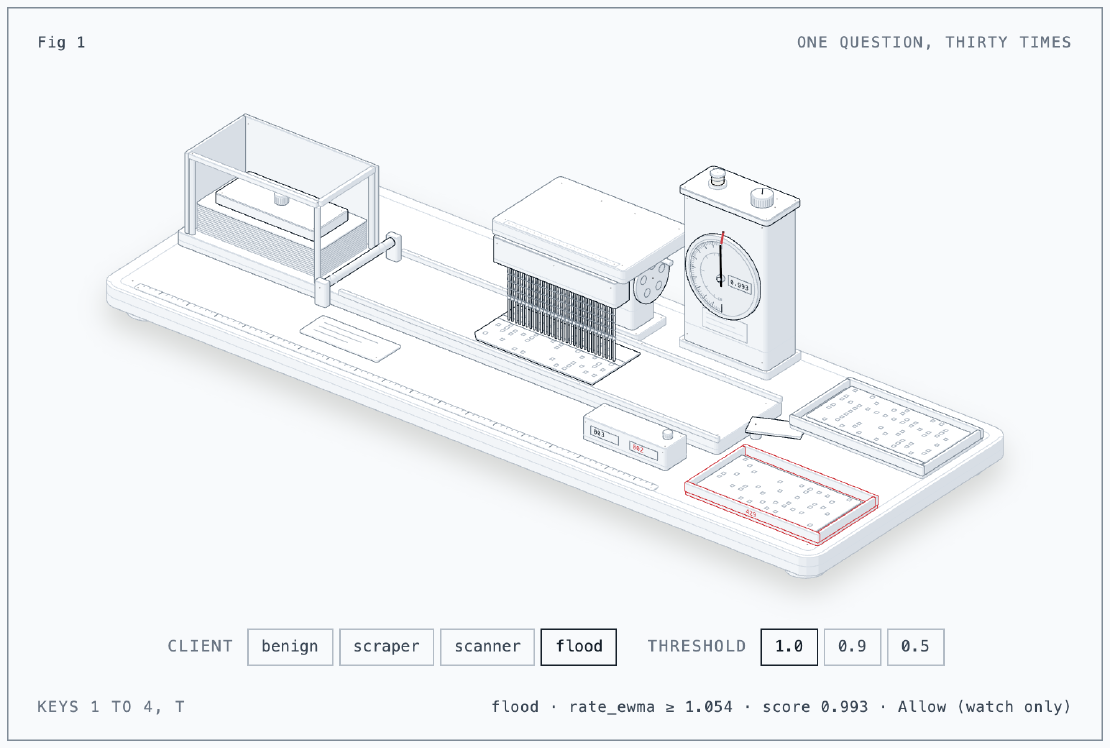
The figure is a punch-card tabulator. Each card is one client’s request,
and only its rate_ewma row lies under the 30 pins, one per tree. Pick a
client and watch the pins: on a benign card they all drop through the
punched row and the dial settles at 0.026, while a scraper, scanner or
flood card stops every pin and the dial climbs to 0.993. Set the threshold
to 0.9 or 0.5 and those cards go to the red 429 tray; at 1.0 the watch
lamp is lit, every card goes to the pass tray and the score is only
recorded.
The figure is drawn with the anatomy skill.
The Situation
- dvarapala 0.19.1, operator and gateways, on the lab’s Kubernetes cluster.
- The gateway in front of ipcalc’s JSON API (
/api/v1/): a token bucket of 60 per client refilling at 6 per second, a Coraza WAF sidecar in observe mode, and the LLM label sampler ([ml.llm]) writing rows to Postgres (persist = true). - Python 3.13 for the load generator, XGBoost 3.1.1 for training, both in throwaway containers.
What dvarapala gives a model, per client (detection.window is 1 s):
| Feature | Meaning |
|---|---|
window_requests | Requests in the current window |
rate_ewma | Average requests per window |
iat_mean, iat_var | Mean and variance of the seconds between requests |
size_mean | Average body size |
no_ua_share | Share of requests without User-Agent |
distinct_paths | Distinct paths in the window, at most 8 |
status_4xx_share | Share of 4xx responses |
global_rate_z, source_entropy | Instance-wide detection state |
The averages move 10% toward each new value, which matters later.
Setup
The pipeline
flowchart LR
  L[load generator] --> G[dvarapala gateway]
  G --> A[ipcalc API]
  G -- sampled, redacted --> M[LLM]
  M -- label --> P[(llm_labels)]
  G -- features --> P
  P --> T[train.py]
  T --> C[ConfigMap model.json]
  C --> G
The gateway samples requests, redacts them (query values become _, keys
stay), asks the LLM for one label, and stores the label with the client’s
feature vector at that moment. Training reads those rows; the model goes
back to the same gateway as a mounted file.
Synthetic traffic with ground truth
A Python pod inside the cluster talked to the gateway’s Service directly,
setting X-Forwarded-For (the gateway trusts the cluster network as a
proxy) with addresses from 198.51.100.0/24, the RFC 5737 documentation
range. Eight clients per profile:
| Profile | Shape | User agent |
|---|---|---|
| benign | one valid API call every 3 to 15 s | Firefox |
| scraper | one valid call per second, steady | python-requests/2.32.3 |
| scanner | probe paths (/.env, /.git/config, wp-login.php), SQLi and XSS in queries, every 0.3 to 1.5 s | none |
| flood | bursts of 120 over 6 connections, every 5 to 10 s | curl/8.11.1 |
The trick for ground truth: each profile adds its own query key, t0 to
t3. Redaction drops the value but keeps the key, so a stored path like
/api/v1/calc?q=_&t1=_ says which profile sent it. The LLM never knows.
To get rows for the benign and scraper clients (no WAF match, under the
rate limit), I added a temporary route for /api/ and a route trigger
with per_client = "5m", so every client got sampled every five minutes.
def scraper(ip):  # steady machine pace under the rate limit, script UA
    while time.time() < END:
        get(ip, valid("t1"), "python-requests/2.32.3")
        time.sleep(1.0 + random.uniform(-0.05, 0.05))
After 30 minutes:
| Profile | Responses |
|---|---|
| benign | 1604 x 200 |
| scraper | 13724 x 200 |
| scanner | 12111 x 404, 3099 x 400 |
| flood | 86022 x 200, 97096 x 429 |
The scraper never saw a 429: one request per second is well under 6. That
is the client the rate limiter cannot catch, and the one I wanted the model
for.
Labels: good at “bad”, bad at “which bad”
psql exported 240 rows. Four had null features and were dropped, which
left 236. Comparing the LLM’s label against the tag:
profile  llm label   rows
benign   benign        35
benign   scanner       13
flood    benign         2
flood    scanner       42
scanner  scanner       96
scraper  benign         1
scraper  scanner       45
scraper  scraper        2
As a binary question (benign or not) the LLM agreed with the ground truth
on 93.2% of rows. As a type it was mostly wrong: a steady python-requests
client and a curl flood both came back as scanner. The 13 benign rows
labeled scanner came from my first run, where a wrong endpoint answered
404 to everyone: status_4xx_share moves only 10% per request, so it was
still high minutes later and the LLM saw it.
So I trained on the tag, not the LLM label. With real traffic there is no tag, and the LLM label (filtered by confidence) is what you have; this run says it is usable for the binary target and not for anything finer.
Training
booster = xgb.train(
    {"objective": "binary:logistic", "max_depth": 3, "eta": 0.3},
    dtrain, num_boost_round=30)
75% train, 25% held out:
held-out scores by profile (min / median / max):
  benign   n= 10  0.026 / 0.026 / 0.026
  scraper  n=  9  0.993 / 0.993 / 0.993
  scanner  n= 27  0.993 / 0.993 / 0.993
  flood    n= 13  0.993 / 0.993 / 0.993
held-out accuracy at 0.5: 100.0%
gain by feature: {'rate_ewma': 24.8}
One feature. Opening model.json shows why the scores are two numbers:
each of the 30 trees has a single split, rate_ewma < 1.054, with one leaf
for yes and one for no (tree 0: -1.209 and +0.366). Every benign client
lands on the same 30 leaves, every other client on the other 30, and the
sum goes through the logistic function to 0.026 or 0.993.
That is not a bug in the training, it is the data. rate_ewma per profile
in the training rows:
| Profile | min | median | max |
|---|---|---|---|
| benign | 1.000 | 1.000 | 1.000 |
| scraper | 1.054 | 1.210 | 1.527 |
| scanner | 1.266 | 1.485 | 1.824 |
| flood | 23.107 | 31.051 | 40.243 |
Every benign row is exactly 1.0. The average only moves when a window has a request, so a client that never sends two requests in the same second stays at 1.0 forever. The scraper’s 1 s sleep has 50 ms of jitter, so now and then two of its requests land in one window and the average creeps up. XGBoost found the cheapest separation: “has this client ever sent two requests within one second”.
Real visitors are messier. A person who clicks twice within a second, or a page that makes two API calls for one action, moves the average from 1.0 to 1.1 and scores 0.993 for its next six requests, until the 10% steps bring it back under 1.054. Enforced, a model trained on my synthetic benign profile would throttle real people.
XGBoost 3 model format
XGBoost 3 saves base_score as a string holding an array,
"[7.8531075E-1]", where older versions wrote a plain number. I checked
that 0.19.1 reads it before deploying: a local docker run of the image
with the model in [ml] started, and six requests gave
dvarapala_ml_score_count 6.
The model in the gateway
The model is a file in a ConfigMap, mounted through the operator’s
gateway.mounts:
configMapGenerator:
  - name: dvarapala-model-v1
    files:
      - model.json=dvarapala-model.json
[ml]
model = "/etc/dvarapala-mounts/model/model.json"
threshold = 1.0

[[ml.llm.triggers]]
on = "ml_band"
band = [0.5, 1.0]
The model is read once at start, so the ConfigMap name carries a version: a new model means a new name, a changed pod spec and a rolled pod.
threshold = 1.0 is the watch-only setting: a score is never above 1, so
nothing is throttled, and dvarapala_ml_score records every score. The
ml_band trigger sends clients scoring between 0.5 and 1.0 to the LLM, so
the model’s suspects get a second opinion I can read in the console. The
temporary route and its trigger came out in the same change.
What the Scores Look Like
A five minute rerun of the same load against the gateway with the model:
dvarapala_ml_score{quantile="0"} 0.026153777535046534
dvarapala_ml_score{quantile="0.5"} 0.9929251404657734
dvarapala_ml_score{quantile="0.99"} 0.9929251404657734
dvarapala_ml_score_count 19566
Two values, as trained. The ml_band trigger picked all 24 attacking
clients and none of the benign ones:
| Profile | ml_band samples | LLM label | Mean confidence |
|---|---|---|---|
| scraper | 8 | scanner | 0.42 |
| scanner | 8 | scanner | 0.82 |
| flood | 8 | scanner | 0.52 |
The LLM is least sure about the scraper, which makes sense: valid requests, a plausible user agent, nothing wrong except the pace.
Turning it on
To see the other half work, I set threshold = 0.9 for one more five
minute run of the same load, then put it back to 1.0:
| Profile | Watching (1.0) | Enforcing (0.9) |
|---|---|---|
| benign | 282 x 200 | 267 x 200 |
| scraper | 2285 x 200 | 141 x 200, 2154 x 429 |
| scanner | 2057 x 404, 492 x 400 | 30 x 404, 271 x 400, 2256 x 429 |
| flood | 14682 x 200, 18798 x 429 | 8 x 200, 33592 x 429 |
The scraper, which the token bucket never touched, lost 94% of its
requests to 429. The 141 that got through, about 18 per client, are most likely the
requests before each client first landed two in one second. The scanner’s
probes stopped reaching the app, and the flood lost the requests the
bucket used to let through between bursts. Benign clients never saw a
429.
So enforcement does what the config reference says. It went back to 1.0 anyway, because of what the table in the training section shows: the benign profile here never double clicks, and real people do.
Lessons
- The model learns whatever separates your data most cheaply. With synthetic profiles that differ mostly in pace, that is one rate threshold. Make the benign traffic as varied as the attacks before trusting more than that.
- Look at the feature values behind a split. “rate_ewma < 1.054” reads like “about one request a second”; the rows show it means “never two requests in one second”, which a real visitor breaks with one double click.
- LLM labels are good enough for “attack or not”. 93.2% agreement on the binary target, poor on the type. Train on the binary label and keep the confidence filter.
- Moving averages remember.
status_4xx_sharecarried a bad first run into labels minutes later. Restart the load, or wait, after a mistake. - Watch before you enforce.
threshold = 1.0plusml_bandgives the score distribution and a second opinion on every suspect, with no visitor affected.
References
- dvarapala: Protection layers, scoring model
- dvarapala: Configuration,
[ml]and[ml.llm] - dvarapala: RFC 0002, adaptive detection
- dvarapala: RFC 0023, LLM labels
- XGBoost: Introduction to Model IO
- IETF: RFC 5737, IPv4 Address Blocks Reserved for Documentation
- GitHub: wheresryan22/anatomy